Skip to content
Contact Us
الميزان دوت نت للمحاسبة والمستودعات
  • Home
  • About the Software
    • About Us
    • Our Clients
  • Products
  • Services
  • Learning
    • Knowledge Base
    • Video Tutorials
  • Blog
  • Downloads
    • Al Mizan .NET
    • Updates
    • Utilities
  • العربية
  • Home
  • About the Software
    • About Us
    • Our Clients
  • Products
  • Services
  • Learning
    • Knowledge Base
    • Video Tutorials
  • Blog
  • Downloads
    • Al Mizan .NET
    • Updates
    • Utilities
  • العربية
  • Home
  • About the Software
    • About Us
    • Our Clients
  • Products
  • Services
  • Learning
    • Knowledge Base
    • Video Tutorials
  • Blog
  • Downloads
    • Al Mizan .NET
    • Updates
    • Utilities
  • العربية
Show Categories
  • Home
  • Knowledge Base
  • User Guide
  • Accounting Menu
  • Transfer Account Transactions in Al Mizan

Transfer Account Transactions in Al Mizan

This window transfers transactions from one account to another. It saves time when there are many transactions of different types and lets you restrict the transfer to selected types. For example, transfer only specified invoices recorded against the customer Hossam, only cash amounts or only commercial papers. You can also restrict transfers to a date range or branch. Open Accounting > Transfer Account Transactions. The window contains these options:

.
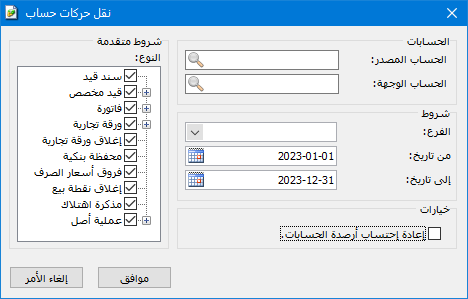
Illustration: transferring account transactions

.

Source Account: The account from which transactions will be transferred.

Destination Account: The account to which transactions will be transferred.

Conditions: #

Branch: Select a company branch to transfer only transactions recorded in that branch.

From Date / To Date: Specify the date range. Only transactions within that period are transferred.

Advanced Conditions — Type: Select a data type to transfer only its transactions, such as invoices or journal entries.

Options — Recalculate Account Balances: Enable this option to recalculate the source and destination account balances after the transfer so they display correctly in the software. Enabling it is recommended when transferring account transactions.

Note:

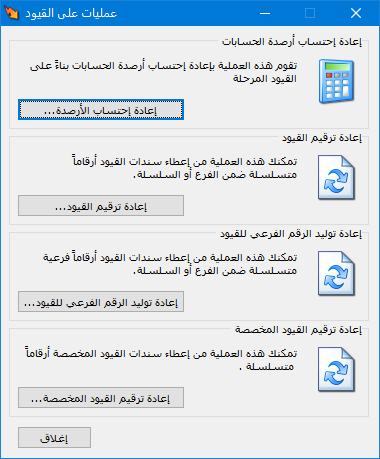
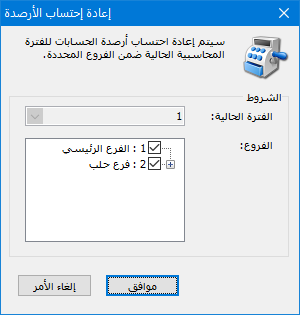
If you forgot to enable balance recalculation during the transfer, open Journal Entries > Journal Operations, choose Recalculate Balances and click OK, as shown below:

See: Recalculate Balances

.

Illustration: conditions

.

Follow our YouTube channel

Share This Article

  • Facebook
  • X
  • LinkedIn
  • Pinterest
Could not find what you need? Contact us

How can we help you?

Updated on October 2, 2026
Account-Specific Analysis in Al MizanAccount Analysis: General Analysis

Powered by BetterDocs

Contents
  • Conditions:
Mizan logo black1

Al Mizan .NET Accounting and Inventory: take the next step toward more effective business management

Quick Links

  • Knowledge Base
  • Privacy Policy
  • Terms and Conditions
  • Contact Us

Stay Informed

Get the latest news and offers from our website 

  • Abdurrahman Nafiz Gürman, No:05
    Güngören/İstanbul
  • +905360652643
  • info@hadarasoft.net
© 2026 Hadarasoft
Instagram Facebook-f Youtube Linkedin
Need help? Contact us