


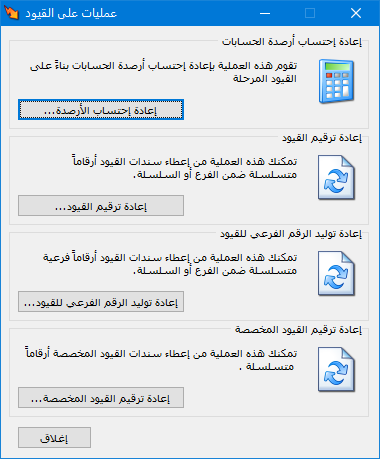
Choose Journal Entries > Journal Operations. The window contains the following main operations:
.
.
Recalculate Balances: #
Recalculate account balances from posted journal entries. This operation also recalculates costs when costing problems result from invoices being entered out of chronological order or from changes to invoice order.
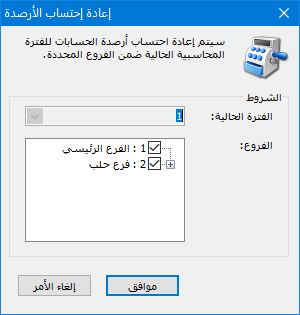
Click Recalculate Balances, then select the accounting period and branches to recalculate, as shown below:
.
.
Renumber Journal Entries:
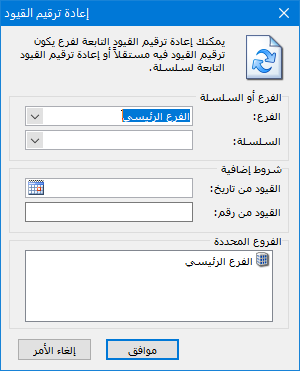
Renumber entries for a branch with independent numbering or for a numbering series. Select the branch or series, and optionally restrict the operation by entry dates or numbers if you want to renumber only part of the entries.
.
.
Regenerate Secondary Journal Numbers: #
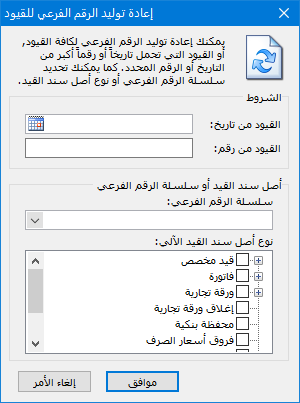
Similarly, regenerate secondary entry numbers for a branch with independent numbering or for a series. Select the secondary numbering series and journal voucher source type. For example, regenerate secondary numbers only for entries originating from invoices. The following illustration shows the relevant window: #
.
.
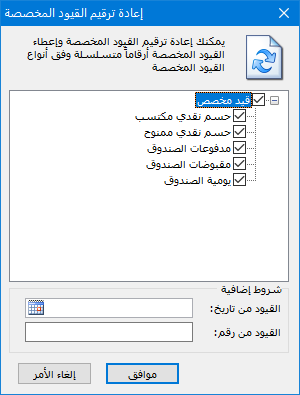
Renumber Custom Journal Entries: #
Use this window to renumber custom entries. Select the custom entry types and optionally restrict the operation by entry dates or numbers.
.
.


