


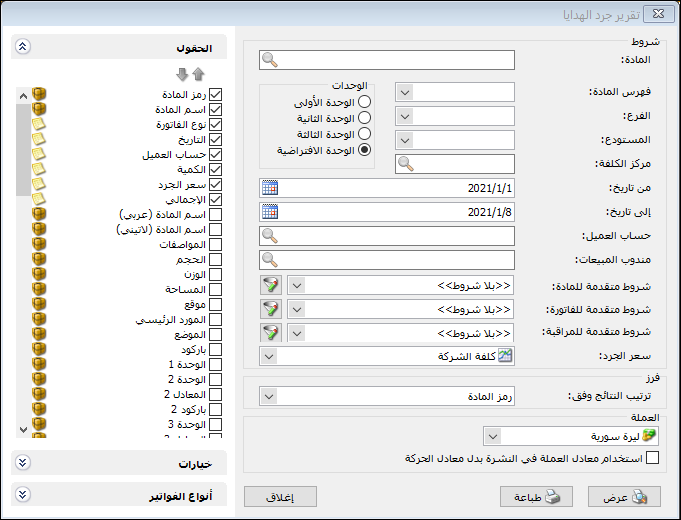
This report provides information about free or bonus units on sales and purchase invoices. The criteria window contains the following options:
.
Conditions:
- Item: Select the item whose free units you want to report.
- Item Category: Select a category to report free units for items in that category.
- Branch: Select a branch to include invoices issued in its warehouses.
- Warehouse: Select a warehouse to include invoices issued in that warehouse.
- Cost Center: Select a cost center to include invoices associated with it.
- From Date / To Date: Specify the date range for the item transactions included in the free units report.
- Customer Account: Select a customer account to report free units given to that customer, or a supplier account to report free units received from that supplier.
- Sales Representative: Select a sales representative to include invoices associated with that representative.
Advanced Conditions: #
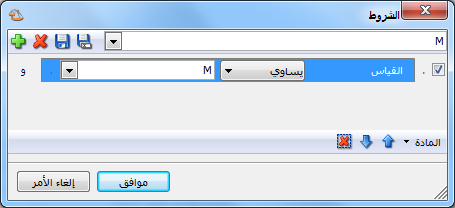
- Advanced Item Conditions: Use item record fields to filter the items included. For example, to report free units for items with size M, set an advanced filter where Size equals M, as shown below:
.
- Advanced Invoice Conditions: Set advanced invoice filters to include free units only from matching invoices.
- Advanced Audit ConditionsSet advanced audit filters to include free units only from matching invoices.
- Inventory Valuation Price: Select the price used to value the item units shown in the report.
Sort: #
Sort Results By: Choose the order for item rows using these options:
- Item Code
- Item Name
- Category Code, Then Item Name
- Quantity Ascending
- Quantity Descending
- Category Code, Then Quantity Ascending
- Category Code, Then Quantity Descending
- Currency and Exchange Rate: Select the report currency and its exchange rate relative to the base currency.
Units: #
The following unit options are available:
- First Unit.
- Second Unit.
- Third Unit.
The report is displayed using the selected unit.
- Default Unit: This option uses the unit marked Default on the Units tab of the item record. It can be the first, second or third unit.
Fields: #
Select report columns in the Fields section. These include item record fields and additional fields such as Invoice Type, Date, Customer Account, Quantity, Inventory Valuation Price and Total.
Options: #
The options section contains:
- Show Sequence Number: Display sequential row numbers in the report.
- Finalized Invoices: Enable this option to include free units from finalized invoices.
- Unfinalized Invoices: Enable this option to include free units from unfinalized invoices.
- Show Physical Items: Enable this option to include records whose Item Type is set to Item on the Advanced tab. These represent physical items held in a warehouse.
- Show Service Items: Enable this option to include records whose Item Type is set to Service on the Advanced tab. These are defined as items but do not represent physical warehouse stock.
- Combine Item Code and Name: Combine item code and name in one report field.
Group Results By: #
Group results using one of the following choices:
- Invoice Type
- Representative
- Payment Method
- Customer
- Warehouse
- Branch
- Item
- Item Category
To illustrate result grouping, #
consider the following example:
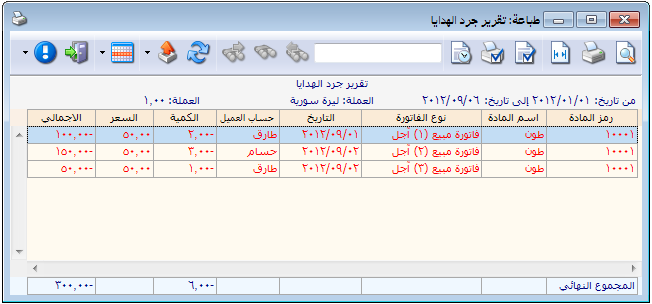
Assume the following invoices exist:
Date — Customer — Quantity — Free Units
1 September 2012 — Tareq — 10 — 2
2 September 2012 — Tareq — 15 — 1
2 September 2012 — Hossam — 20 — 3
Without grouping, the report appears as follows:
.
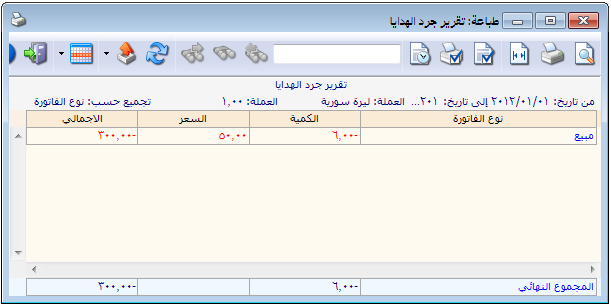
With Group Results By set to Invoice Type, the report appears as follows:
.
With Group Results By set to Customer, the report appears as follows:
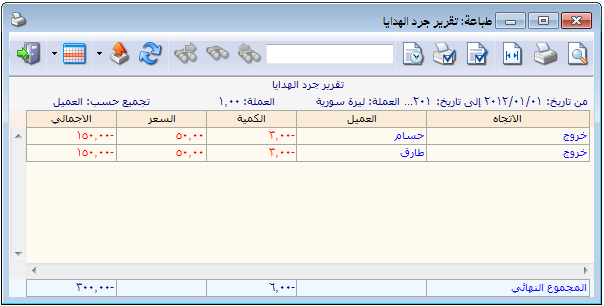
.
With Group Results By set to Item, the report appears as follows:
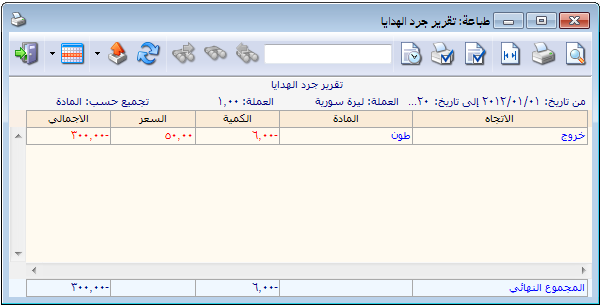
.
Show Invoice Count: #
Enable this option to display the number of invoices represented by each grouped row. In the previous item grouping example, three invoices were combined into one row, so its Invoice Count is 3, as shown below:
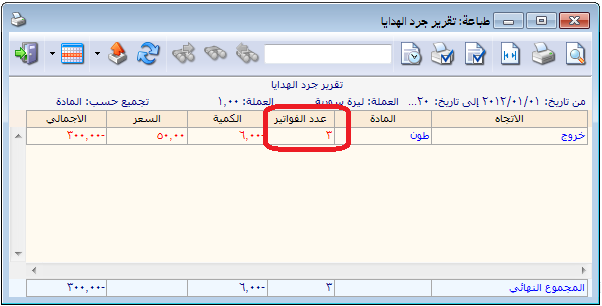
.
Break Down Report Totals: #
Enable this option to display a final summary row broken down by invoice type, as shown below:
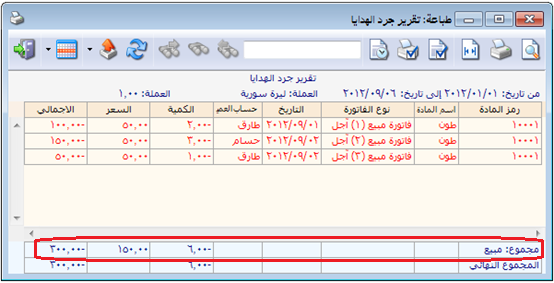
.
Invoice Types: #
Select the invoice types whose transactions should be included in the free units report.
Show: #
Display the report using the preceding conditions.
Print: #
Click this button to print the final report.
Close: #
Close the report conditions window.
Practical examples of information available from the Free Units Inventory report:
- Free units given to customers, valued at cost.
- Free units of Cotton given to customers.
- Free units from the Canned Goods category given to customers.
- Free units received into the Main Warehouse only.
- Free units given to customers during the first month.
- Free units given to the customer Tareq.
- Free units given to customers on wholesale sales invoices.
- Free units received from suppliers during the first month and entered into the Main Warehouse.
- Free units given to customers on invoices whose description contains “Al Haram Shipping”.
.


