


Uses of Allocation Accounts #
An allocation account is a virtual account outside the chart of accounts. When used in journal entries, its amount is distributed among selected accounts or cost centers according to specified percentages. Choose Accounting > Allocation Accounts to open the allocation accounts window.
Consider the following example:
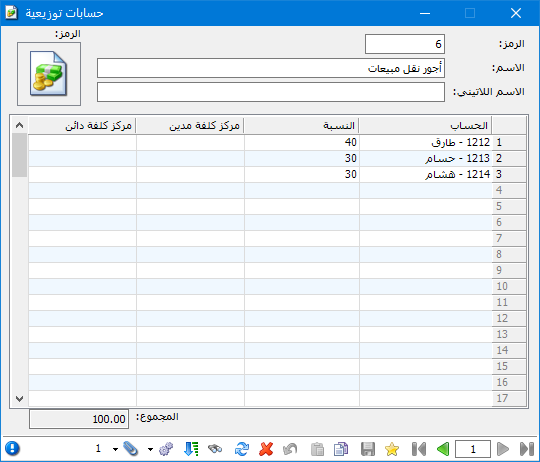
Suppose you pay sales delivery costs for four customers in Aleppo: Khaled, Hossam, Tarek and Hisham. You want to distribute those costs among the customers in specified proportions. Allocation accounts reduce the time and effort required to enter a separate expense for each customer. Proceed as follows:
Define an Allocation Account Record #
Choose Accounting > Allocation Accounts. Enter an allocation account name, such as Sales Delivery Costs. Add the four customer accounts and enter each customer share as a percentage. In this example, the allocation is equal, as shown below:
.
.
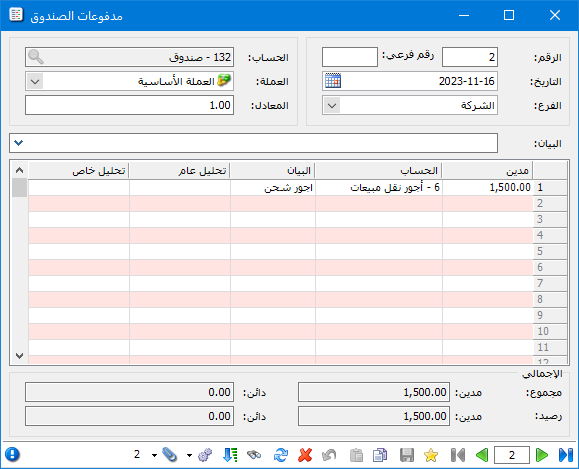
Suppose you then pay 1,500 Syrian pounds in cash for sales delivery costs. Enter this payment using a Cash Payments journal entry, as shown below:
.
.
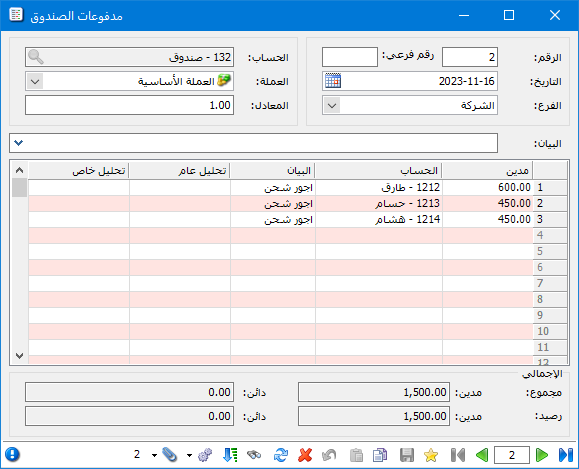
Save and close the entry, then reopen it or click Refresh. The virtual Sales Delivery Costs account disappears and is replaced by the customer accounts, with amounts calculated according to the percentages specified in the allocation account. The following illustration shows the refreshed payment entry:
.
.
Note:
If the specified percentages total less than 100% and some percentage fields are blank, complete the percentages correctly. Otherwise, a warning asks for the total percentage of the associated accounts to equal 100%.
If you continue saving without filling the blank percentage fields, the software distributes the remaining percentage equally among them. A zero in a percentage field is treated as an entered value, not as a blank field.
.


