


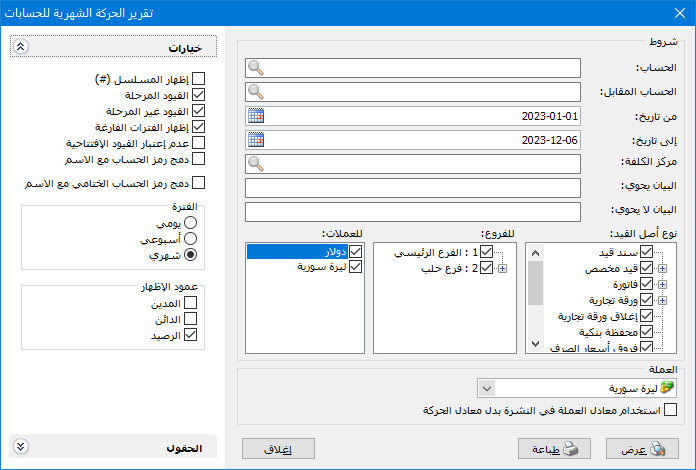
This report summarizes transactions for one account or a group of accounts over periods selected by the user. Rows represent accounts and columns represent time periods. Choose Reports > Monthly Account Transactions to open the conditions window with these fields:
.
Conditions: #
- Account: Select a subsidiary or parent account whose periodic transactions should be displayed.
- Counterpart Account: Use a counterpart account to isolate part of the selected account activity. For example, enter customer Tarek in Account and Sales in Counterpart Account to display his sales grouped by day, week or month. To display discounts given to Tarek, use Discounts Given as the counterpart account.
- From Date / To Date: Specify the report date range.
- Cost Center: Select a cost center to include entries involving it.
- Description Contains: Enter text to include entries whose descriptions contain it.
- Description Does Not Contain: Enter text to include entries whose descriptions do not contain it.
Entry Source Type: #
Select the sources from which account transactions should be included., For example, select only Invoice to include invoice-generated entries and exclude entries from other sources.
Branches: #
Select one or more branches to include their entries.
Currencies: #
Select transaction currencies to include. For example, selecting Syrian pounds excludes cash receipts recorded in Jordanian dinars.
- Currency: Select the currency in which the report should be displayed.
- Exchange Rate: Specify the exchange rate relative to the base currency. This is available only for a secondary currency and offers two choices.
- Use the Exchange-Rate Schedule: Retrieve exchange rates automatically from the schedule, using the rate applicable on each transaction date.
- Use a Specified Exchange Rate: Enter a rate in the field that appears and use it to display the report.
- Use the Scheduled Currency Rate Instead of the Transaction Rate: Use the rate from the exchange-rate schedule instead of the rate recorded in the original transaction.
Options: #
The options section contains:
- Show Sequence Number: Display sequential numbers for the accounts shown.
- Posted Entries: Include monthly account transactions from posted entries.
- Unposted Entries: Include monthly account transactions from unposted entries.
- Show Empty Periods: Include all periods in the date range, even those without activity or values. When disabled, empty periods are hidden.
- Ignore Opening Entries: Exclude amounts in opening entries from the periodic transactions.
- Combine Account Code and Name: Combine the account code and name in one field.
- Combine Closing Account Code and Name: Combine the selected closing account code and name in one field.
Period: #
Three period choices are available:
- Daily: Group each account transactions by day within the report date range.
- Weekly: Group each account transactions by week within the report date range.
- Monthly: Group each account transactions by month within the report date range.
Display Columns: #
Enable one or more of these three fields:
Debit, Credit and Balance.
Fields: #
Enable additional fields related to accounts.
- Show: Display the report.
- Print: Print the report.
- Close: Close the report.
Examples of Information Available from the Monthly Account Transactions Report:
- Customer transactions for the first six months, grouped by month.
- Monthly receipts from each customer during the first six months.
- Monthly transactions for customer Tarek from posted entries only.
- Monthly debit, credit and balance values for Tarek during the first six months.
- Daily cash account transactions during the first week of the first month.
- Weekly Sales account transactions during the third month.
- Monthly supplier account transactions showing credit amounts only.
- Monthly balances for each expense account.
.


