


Skip to content
Contact Us
الميزان دوت نت للمحاسبة والمستودعات
  • Home
  • About the Software
    • About Us
    • Our Clients
  • Products
  • Services
  • Learning
    • Knowledge Base
    • Video Tutorials
  • Blog
  • Downloads
    • Al Mizan .NET
    • Updates
    • Utilities
  • العربية
  • Home
  • About the Software
    • About Us
    • Our Clients
  • Products
  • Services
  • Learning
    • Knowledge Base
    • Video Tutorials
  • Blog
  • Downloads
    • Al Mizan .NET
    • Updates
    • Utilities
  • العربية
  • Home
  • About the Software
    • About Us
    • Our Clients
  • Products
  • Services
  • Learning
    • Knowledge Base
    • Video Tutorials
  • Blog
  • Downloads
    • Al Mizan .NET
    • Updates
    • Utilities
  • العربية
Show Categories
  • Home
  • Knowledge Base
  • User Guide
  • Definitions Menu
  • Payment Methods in Al Mizan

Payment Methods in Al Mizan

Define payment methods for sending or receiving money through invoices and point of sale. Choose Definitions > Payment Method Types to open the window shown above, which contains these fields:

Information: #

Code: The record code.

Name: The payment method name in Arabic.

Latin Name: The payment method name in Latin characters. 

Payment: #

Currency: The currency used for payment.

Account: The account to which paid amounts are posted.

Collection Fee Percentage: #

Enter the percentage fee charged for this payment method, where applicable. Credit card payments are a common example, as shown above.

Round To: Enter the increment to which the calculated amount should be rounded, and select rounding up, down or to the nearest increment.

Collection Fee: Contains the following:

Debit Account: Enter the collection fee debit account, usually the fee expense account.

Credit Account: Enter the collection fee credit account, usually a fee payable account or a bank account.

Fixed Amount: Enter any fixed fee charged for this payment method. Credit cards are a common example.

Debit and Credit Accounts: These work in the same way as the accounts used for percentage collection fees.

Allow Refunds: Enable this option to permit refunds through the defined payment method.

Allow Closing: Enable this option to transfer amounts posted to the default payment method account automatically to the closing account.

Closing Accounts: Enter the account used to close the payment method account to which paid amounts are posted.

Cash Surplus Account: Enter the account used to record a surplus in the point-of-sale cash drawer.

Cash Shortage Account: Enter the account used to record a shortage in the point-of-sale cash drawer.

.
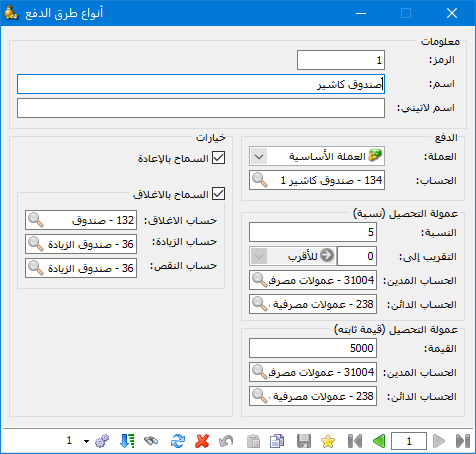
Illustration: percentage collection fee

.

See: Define Accounts in the Chart of Accounts

Follow our YouTube channel

Share This Article

  • Facebook
  • X
  • LinkedIn
  • Pinterest
Could not find what you need? Contact us

How can we help you?

Updated on October 2, 2026
Define Branch Records and Configure Their OptionsDefine the Currency Exchange-Rate Schedule

Powered by BetterDocs

Contents
  • Information:
  • Payment:
  • Collection Fee Percentage:
Mizan logo black1

Al Mizan .NET Accounting and Inventory: take the next step toward more effective business management

Quick Links

  • Knowledge Base
  • Privacy Policy
  • Terms and Conditions
  • Contact Us

Stay Informed

Get the latest news and offers from our website 

  • Abdurrahman Nafiz Gürman, No:05
    Güngören/İstanbul
  • +905360652643
  • info@hadarasoft.net
© 2026 Hadarasoft
Instagram Facebook-f Youtube Linkedin
Need help? Contact us