


Skip to content
Contact Us
الميزان دوت نت للمحاسبة والمستودعات
  • Home
  • About the Software
    • About Us
    • Our Clients
  • Products
  • Services
  • Learning
    • Knowledge Base
    • Video Tutorials
  • Blog
  • Downloads
    • Al Mizan .NET
    • Updates
    • Utilities
  • العربية
  • Home
  • About the Software
    • About Us
    • Our Clients
  • Products
  • Services
  • Learning
    • Knowledge Base
    • Video Tutorials
  • Blog
  • Downloads
    • Al Mizan .NET
    • Updates
    • Utilities
  • العربية
  • Home
  • About the Software
    • About Us
    • Our Clients
  • Products
  • Services
  • Learning
    • Knowledge Base
    • Video Tutorials
  • Blog
  • Downloads
    • Al Mizan .NET
    • Updates
    • Utilities
  • العربية
Show Categories
  • Home
  • Knowledge Base
  • User Guide
  • File Menu
  • Delete a Database in Al Mizan

Delete a Database in Al Mizan

To delete a particular database, first connect to it and choose Delete Database. The following window displays the name of the database to be deleted:
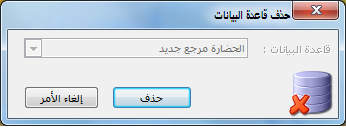
Illustration: deleting a database in Al Mizan

.

Click Delete. A message appears offering to create a backup of the database before deletion:
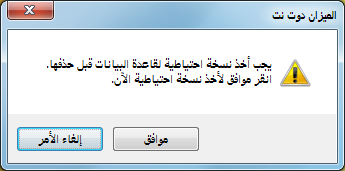
Illustration: deleting a database in Al Mizan

.

A further message asks you to confirm that deletion should continue:
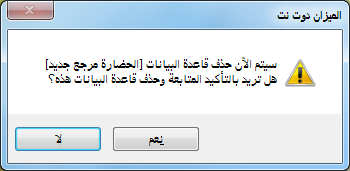
Illustration: deleting a database in Al Mizan

.

Note:

Only the system administrator can delete a database. Other users cannot perform this operation even if they have otherwise been granted full permissions.

See: Create and Restore a Database Backup

Follow our YouTube channel

Share This Article

  • Facebook
  • X
  • LinkedIn
  • Pinterest
Could not find what you need? Contact us

How can we help you?

Updated on October 2, 2026
Attach Database FilesCreate and Restore a Database Backup

Powered by BetterDocs

Mizan logo black1

Al Mizan .NET Accounting and Inventory: take the next step toward more effective business management

Quick Links

  • Knowledge Base
  • Privacy Policy
  • Terms and Conditions
  • Contact Us

Stay Informed

Get the latest news and offers from our website 

  • Abdurrahman Nafiz Gürman, No:05
    Güngören/İstanbul
  • +905360652643
  • info@hadarasoft.net
© 2026 Hadarasoft
Instagram Facebook-f Youtube Linkedin
Need help? Contact us