


Open Reports and Financial Statements to display the available financial reports, as shown below.
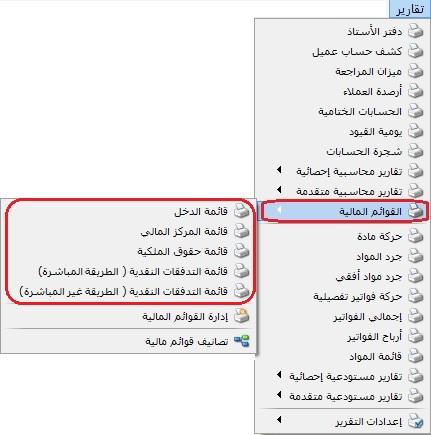
Choose a statement from the side menu. Opening it displays the following report criteria.
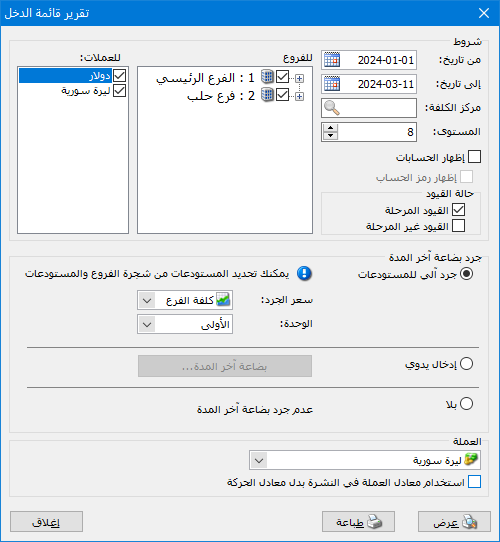
Conditions: #
From Date / To Date: Set the reporting period.
Level: Set the detail level according to the item hierarchy defined in Manage Financial Statements.
Show Accounts: Display accounts linked to each statement item through its classification.
Cost Center: Report on financial movements assigned to the selected center.
Entry Status: Include posted entries, unposted entries or both.
Branches: Report on one branch, selected branches or the whole company.
Closing Inventory: #
Three closing-inventory choices are available:
None: Use this with perpetual inventory when closing stock is already reflected in an inventory account, or when the company does not hold inventory.
Manual Entry: Use this when stock is not tracked accurately in the program. Enter the inventory value and the two closing inventory accounts to which it is assigned.
Automatic Warehouse Inventory: The program calculates stock and assigns its value to the closing inventory accounts in general settings or the applicable item accounting groups. Select the valuation price, usually Company Cost.
Unit: The first unit is the default.
Currency and Exchange Rate: Select the report currency and its rate against the base currency.
Show: Display the report using the preceding conditions.
Print: Print the final report.
Close: Close the report criteria window.
Examples of Information Available from the Closing Accounts Report:
- Income Statement: Displays gross and net profit for the company or a branch.
- Statement of Financial Position: Displays assets, liabilities and equity for the company or a branch at the selected reporting date.
- Direct-Method Cash Flow Statement for the company or a branch.
- Indirect-Method Cash Flow Statement for the company or a branch.
Manage Financial Statements: #
Add a new financial statement, or edit or delete items in an existing statement, as shown below.
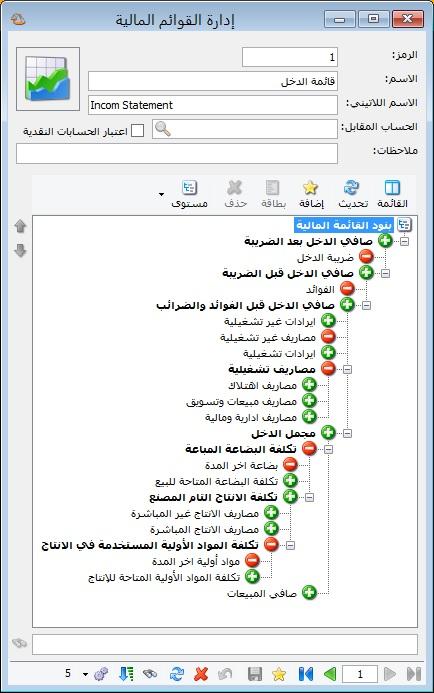
Code: Assigned sequentially when a statement is first saved, or entered manually.
- Name: The statement name, such as Income Statement or Statement of Financial Position.
- Latin Name: The English statement name.
- Counterpart Account: Apply a counterpart-account filter to items with the corresponding option enabled in their cards, explained later.
Use this in direct or indirect cash flow statements for cash-paid expenses or cash-received revenue, enabling Consider Counterpart Account Criterion in the applicable item cards.
- Consider Cash Accounts: Similar to Counterpart Account, but supports multiple cash counterparts identified by Cash Account in Financial Statement Classification, explained later.
- Notes: Enter any notes.
Define Items in Manage Financial Statements: #
Add, delete or move statement items within Manage Financial Statements.
A Simple-Acc-Tree database includes predefined items. Edit them or remove those not linked to accounts directly or through financial classifications. Right-click an item and choose Delete, or select it and click Delete on the toolbar.
Financial Statement Item Card: #
As illustrated below:
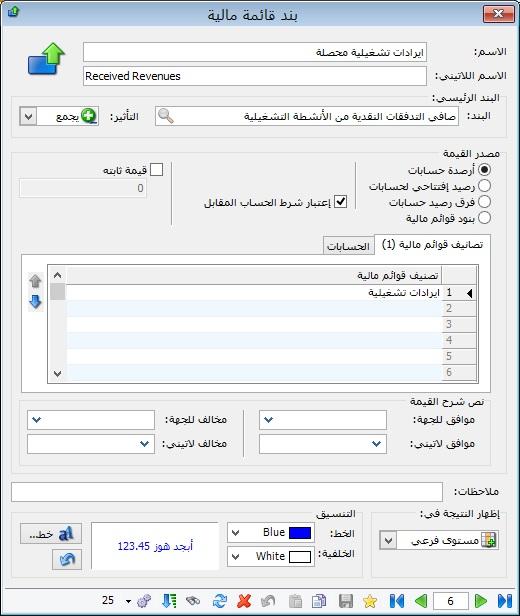
- Name: The item name, such as Collected Operating Revenue or Net Sales.
- Latin Name: The item’s English name.
- Parent Item: Contains the following fields:
- Item: The immediate parent of this item.
- Effect: Whether this item is added or subtracted in the statement.
Note 1: #
The linked classification’s normal debit or credit nature affects how the item contributes to the statement. Consider these cases:
- Debit Classification + Add: Add a debit item balance; subtract if the balance becomes credit.
- Debit Classification + Subtract: Subtract a debit item balance; add if the balance becomes credit.
- Credit Classification + Add: Add a credit item balance; subtract if the balance becomes debit.
- Credit Classification + Subtract: Subtract a credit item balance; add if the balance becomes debit.
Note 2: #
If an item contains classifications with different natures, the program follows the first classification. Put the classification consistent with the item’s intended effect first.
Example for Note 2:
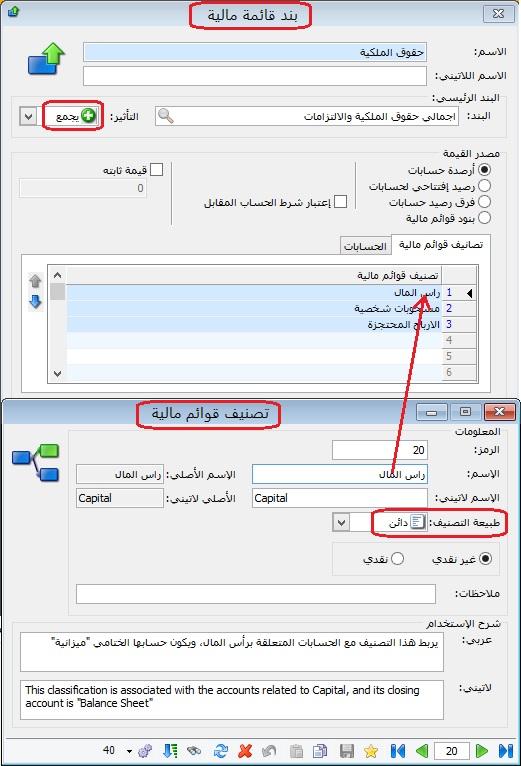
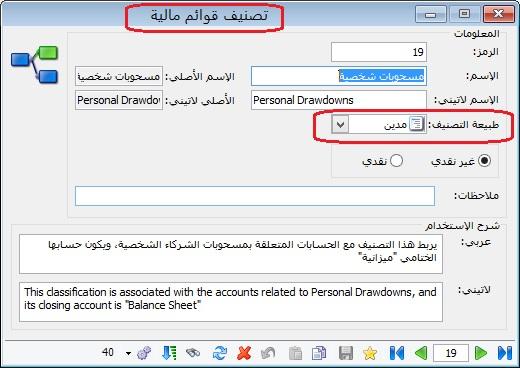
For an Equity item on the liabilities-and-equity side, the effect should be Add with a credit nature. Put Capital or Retained Earnings first, then other classifications. Do not put Drawings first because its normal debit nature differs from Equity’s credit nature.
The following two illustrations show this.
The first shows Equity with a first classification matching the intended effect.
The second shows the nature of Drawings.
Value Source: #
The following sources are available:
- Account Balances: Use current balances of accounts linked to the item through classifications.
- Opening Account Balances: Use opening balances of linked accounts.
- Account Balance Difference: Use opening balance minus current balance for linked accounts.
Example:
Example:
In direct cash flows, the customer receivable difference is opening debit balances minus closing debit balances.
- Financial Statement Items: Retrieve a value from another statement item selected in the Financial Statement Items table.
- Consider Counterpart Account Criterion: Explained earlier.
- Fixed Value: Enter a fixed amount for the item.
- Value Explanation Text: Enter wording that describes the resulting item value.
- Notes: Enter notes specific to this item.
- Show Result At: Two options are available:
- Parent Level: Display the child item at the same level as its parent.
- Sublevel: Display the child item one level below its parent.
- Formatting: Set the text and background appearance using these options.
- Text: Change the text color.
- Background: Change the item’s background color.
- Font: Change the font type, size and other formatting.
- Undo Button: Before saving, Undo reverts the formatting changes.

Financial Statement Classification: #
Classifications link account cards to financial statements. Define them in the following window.
- Code: Assigned automatically or entered manually.
- Name: The classification name, such as Other Credit Balances or Cash.
- Latin Name: The item’s English name.
- Original Name: A read-only field retaining the program’s original classification name if it has been renamed.
- Original Latin Name: A read-only field retaining the original Latin name if it has been changed.
- Classification Nature: Choose Debit or Credit according to the linked accounts.
- Noncash / Cash: Identify cash accounts for cash flow statements. Use with Consider Counterpart Account Criterion to select cash-paid expenses or cash-received revenue.
- Notes: Enter classification-specific notes.
- Usage Description: Explain how to use the classification and which accounts should be linked to it.
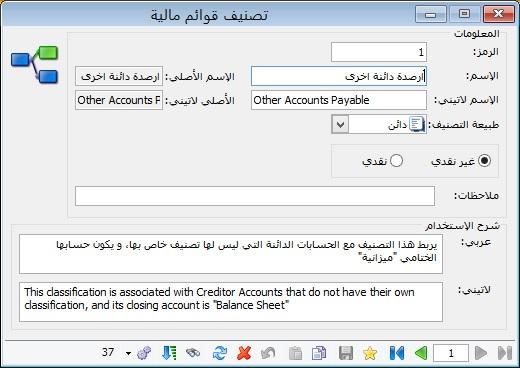
The program includes forty predefined classifications for linking account cards to statement items:
Classifications #
| # | Classification Name | Nature of Classification |
Description |
| 1 | Other Credit Balances | Credit | Link credit accounts that do not have a specific classification, with Balance Sheet as their final account. |
| 2 | Notes Payable | Credit | Link notes payable accounts classified under the Balance Sheet. |
| 3 | Suppliers | Credit | Link supplier accounts classified under the Balance Sheet. |
| 4 | Accumulated Depreciation | Credit | Link accumulated depreciation accounts classified under the Balance Sheet. |
| 5 | Fixed Assets | Debit | Link fixed asset accounts classified under the Balance Sheet. |
| 6 | Other Debit Balances | Debit | Link debit accounts without a specific classification, classified under the Balance Sheet. |
| 7 | Doubtful Customers | Debit | Link customer accounts whose collectibility is uncertain, classified under the Balance Sheet. |
| 8 | Bad-Debt Customers | Debit | Link customer accounts considered unlikely to be collected, classified under the Balance Sheet. |
| 9 | Good Customers | Debit | Link general customer receivable accounts classified under the Balance Sheet. |
| 10 | Notes Receivable | Debit | Link commercial papers receivable from customers, classified under the Balance Sheet. |
| 11 | Bank | Debit | Link company bank accounts classified under the Balance Sheet. |
| 12 | Cash | Debit | Link company cash accounts classified under the Balance Sheet. |
| 13 | Interest | Debit | Link interest accounts classified under Profit and Loss. |
| 14 | Operating Revenue | Credit | Link revenue from the company’s main activity, classified under Profit and Loss. |
| 15 | Cost of Goods Available for Sale | Debit | Under periodic inventory, link Purchases, Purchase Returns, Discount Received, Purchase Expenses and related purchase costs. Under perpetual inventory, link Cost of Sales as required by the program’s statement configuration. |
| 16 | Net Sales | Credit | Link Sales, Sales Returns and Discount Allowed, classified under Trading. |
| 17 | Administrative and Finance Expenses | Debit | Link relevant operating expense accounts classified under Profit and Loss. |
| 18 | Sales and Marketing Expenses | Debit | Link sales and marketing expense accounts, classified under Profit and Loss. |
| 19 | Drawings | Debit | Link partners’ personal drawings accounts classified under the Balance Sheet. |
| 20 | Capital | Credit | Link capital accounts classified under the Balance Sheet. |
| 21 | Retained Earnings | Credit | Link retained earnings accounts classified under the Balance Sheet. |
| 22 | Income Tax Payable | Credit | Link income tax liability accounts classified under the Balance Sheet. |
| 23 | Closing Inventory — Trading | Credit | Link closing inventory accounts classified under Trading. |
| 24 | Opening Inventory | Debit | Link opening inventory accounts classified under Trading. |
| 25 | Losses on Sale of Fixed Assets | Debit | Link fixed asset sale loss accounts classified under Profit and Loss. |
| 26 | Gains on Sale of Fixed Assets | Credit | Link fixed asset sale gain accounts classified under Profit and Loss. |
| 27 | Depreciation Expense | Debit | Link depreciation expense accounts classified under Profit and Loss. |
| 28 | Branch Accounts | Debit | Link branch current accounts classified under the Balance Sheet, treated similarly to customer and supplier accounts. |
| 29 | Partners’ Current Accounts | Credit | Link partners’ current accounts classified under the Balance Sheet. |
| 30 | Income Tax | Debit | Link income tax expense accounts classified under Profit and Loss. |
| 31 | Closing Inventory — Balance Sheet | Debit | Link closing inventory accounts classified under the Balance Sheet. |
| 32 | Cost of Raw Materials Available for Production | Debit | Link Raw Material Purchases, Raw Material Purchase Returns, Discount Received on raw material purchases, Raw Material Purchase Expenses and other relevant manufacturing costs. |
| 33 | Closing Raw Materials — Operating | Credit | Link closing raw-material inventory accounts classified under Operating. |
| 34 | Direct Production Expenses | Debit | Link expenses directly related to production, classified under Operating. |
| 35 | Indirect Production Expenses | Debit | Link expenses indirectly related to production, classified under Operating. |
| 36 | Opening Raw Materials | Debit | Link opening raw-material inventory accounts classified under Operating. |
| 37 | Accrued Expenses | Credit | Link accrued expense liabilities classified under the Balance Sheet. |
| 38 | Revenue Received in Advance | Credit | Link advance revenue liabilities classified under the Balance Sheet. |
| 39 | Prepaid Expenses | Debit | Link prepaid expense accounts classified under the Balance Sheet. |
| 40 | Accrued Revenue | Debit | Link revenue receivable accounts classified under the Balance Sheet. |
Using Direct and Indirect Cash Flow Statements: #
1. Additional Guidance on Linking Accounts to Direct Cash Flow Classifications #
A. Net Cash Flows from Operating Activities: #
(+) Receipts from Customers #
| Effect on Parent Item | Item | Value Source | Classification | Description |
| (+) | Net Sales | Financial Statement Items | Income Statement / Net Sales | Start with Net Sales from the Income Statement, then adjust for opening and closing customer receivables to calculate cash collected during the period. |
| (+) | Opening Receivable Balances | Opening Account Balances | All classifications for customers and debtors purchasing goods, excluding services. | Link classifications for customers purchasing goods only. In this configuration, service customers are excluded because their revenue is not included in Net Sales. |
| (-) | Closing Receivable Balances | Account Balances | All classifications for customers and debtors purchasing goods, excluding services. | Link classifications for customers purchasing goods only, excluding service customers whose revenue is outside Net Sales. |
(-) Cash Paid to Suppliers #
| Effecton Parent Item | Item | Value Source | Classification | Description |
| (+) | Cost of Goods Sold | Financial Statement Items | Income Statement / Cost of Goods Sold | Start with Cost of Goods Sold from the Income Statement, then adjust for opening and closing inventory and supplier balances to determine cash paid to suppliers during the period. |
| (-) | Opening Inventory | Account Balances Or Opening Account Balances, since both options give the same opening amount. | Opening Inventory | Link all opening inventory classifications. Cost of Goods Sold equals Opening Inventory Opening Inventory plus Purchases and Purchase Expenses, minus Purchase Returns, Discount Received and Closing Inventory. In direct cash flows, subtractOpening Inventory from Cost of Goods Sold when calculating cash payments to suppliers. |
| (+) | Closing Inventory | Account Balances | Closing Inventory — Balance Sheet | Link all closing inventory classifications. Cost of Goods Sold equals Opening Inventory plus Purchases and Purchase Expenses, minus Purchase Returns and Discount Received minus Closing Inventory.In direct cash flows, addClosing Inventory to Cost of Goods Sold when calculating cash payments to suppliers. |
| (+) | Opening Payable Balances | Opening Account Balances | All classifications for suppliers and creditors providing goods, excluding services. | Link classifications for suppliers providing goods only. Service purchases are excluded here because they are not included in Cost of Goods Sold. |
| (-) | Closing Payable Balances | Account Balances | All classifications for suppliers and creditors providing goods, excluding services. | Link classifications for suppliers providing goods only. Service purchases are excluded here because they are not included in Cost of Goods Sold. |
(-) Income Tax Paid During the Period: #
| Effect on Parent Item | Item | Value Source | Classification | Description |
| (+) | Current-Period Income Tax | Account Balances | Income Tax | Link current-period income tax expense classifications. Income Tax links expense account cards classified under Profit and Loss to Current-Period Income Tax. |
| (+) | Opening Income Tax Payable | Opening Account Balances | Income Tax Payable | Link income tax liabilities from earlier years. Income Tax Payable links Balance Sheet liability accounts to opening and closing tax payable items. |
| (-) | Closing Income Tax Payable | Account Balances | Income Tax Payable | Link income tax liabilities from earlier years. Income Tax Payable links Balance Sheet liability accounts to opening and closing tax payable items. |
Other Operating Cash Flow Items: #
| Effect on Parent Item | Item | Value Source | Classification | Description |
| (-) | Accrued Revenue Collected | Account Balances | Accrued Revenue / Other Debit Balances | Link accrued revenue and other debit balances for customers purchasing services. These accounts are classified under the Balance Sheet. In the program’s configuration, set the parent effect to minus to accommodate their debit nature relative to credit-nature cash revenue items. Enable Consider Counterpart Account Criterion to include only cash collections. |
| (-) | Prepaid Expenses | Account Balances | Prepaid Expenses | Link prepaid expense classifications whose accounts belong to the Balance Sheet. Enable Consider Counterpart Account Criterion to include only cash payments. |
| (+) | Revenue Received in Advance | Account Balances | Revenue Received in Advance | Link advance revenue classifications whose accounts belong to the Balance Sheet. Enable Consider Counterpart Account Criterion to include only cash receipts. |
| (+) | Accrued Expenses Paid | Account Balances | Accrued Expenses / Other Credit Balances | Link accrued expense and other credit balance classifications for service creditors, with Balance Sheet accounts. In the program’s configuration, set the parent effect to plus to accommodate their credit nature relative to debit-nature cash expense items. Enable Consider Counterpart Account Criterion to include only cash payments. |
| (-) | Operating Expenses Paid | Account Balances | All operating expense classifications incurred during the year. | Link operating expense classifications whose accounts belong to Profit and Loss. Enable Consider Counterpart Account Criterion to include only paid amounts. |
| (+) | Operating Revenue Collected | Account Balances | All operating revenue classifications earned during the year. | Link operating revenue classifications whose accounts belong to Profit and Loss. Enable Consider Counterpart Account Criterion to include only collected amounts. |
B. Net Cash Flows from Investing Activities: #
| Effect on Parent Item | Item | Value Source | Classification | Description |
| (-) | Cash from Fixed Asset Purchases or Sales | Account Balances | Fixed Assets / Gains on Sale of Fixed Assets / Losses on Sale of Fixed Assets | Link fixed asset and disposal gain or loss classifications. Fixed asset accounts belong to the Balance Sheet; gain and loss accounts belong to Profit and Loss. Enable Consider Counterpart Account Criterion to capture the cash component of purchases or sales in this configuration. |
| (-) | Cash Interest Paid or Received | Account Balances | Interest | Link relevant interest classifications, such as interest on loans. Enable Consider Counterpart Account Criterion to include only cash amounts. |
C. Net Cash Flows from Financing Activities: #
| Effect on Parent Item | Item | Value Source | Classification | Description |
| (+) | Cash from Capital Increases or Reductions | Account Balances | Capital | Link capital classifications and enable Consider Counterpart Account Criterion to include only cash-related capital changes. |
D. Cash Balance at the Start of the Year: #
| Effect on Parent Item | Item | Value Source | Classification | Description |
| (+) | Opening Cash Balance | Opening Account Balances | Cash / Bank / Other Cash Classifications. | Link all applicable cash classifications, such as Cash and Bank. |
2. Additional Guidance on Linking Accounts to Indirect Cash Flow Classifications #
A. Net Cash Flows from Operating Activities: #
- (+) Net Cash Flows from Operating Activities include the following main items:
- (+) Cash Operating Profit Before Working Capital Changes
| Effect on Parent Item | Item | Value Source | Classification | Description |
| (+) | Income Before Interest and Taxes | Financial Statement Items | Income Statement / Income Before Interest and Taxes | Start with income before interest and taxes, adjust for noncash expenses and revenue, then account for cash interest and tax payments as required by the configured statement. |
| (+) | Depreciation Expense | Account Balances | Depreciation Expense | Depreciation is a noncash expense. Add it back to Income Before Interest and Taxes when reconciling profit to cash flow; depreciation does not itself reserve cash for replacement assets. |
| (-) | Gains on Sale of Fixed Assets | Account Balances | Gains on Sale of Fixed Assets | Deduct disposal gains from operating profit when preparing indirect operating cash flows because asset sale proceeds are reported within investing activities. |
| (+) | Losses on Sale of Fixed Assets | Account Balances | Losses on Sale of Fixed Assets | Add disposal losses back to operating profit when preparing indirect operating cash flows; the related asset sale proceeds belong within investing activities. |
(-) Change in Merchandise Inventory #
| Effect on Parent Item | Item | Value Source | Classification | Description |
| (-) | Opening Inventory | Account Balances Or Opening Account Balances, since both options give the same opening amount. | Opening Inventory | Remove the inventory change already included in Income Before Interest and Taxes by subtracting Opening Inventory because its effect is already reflected in that income figure. |
| )+) | Closing Inventory | Account Balances | Closing Inventory | Remove the inventory change already included in Income Before Interest and Taxes by adding Closing Inventory because its effect is already reflected in that income figure. |
Other Operating Cash Flow Items: #
| Effect on Parent Item | Item | Value Source | Classification | Description |
| (+) | Change in Payable Accounts | Account Balance Difference | All classifications for Suppliers, Notes Payable, Other Credit Balances, Accrued Expenses and Revenue Received in Advance. | Link these payable classifications, excluding balances relating to advances for fixed asset purchases or fixed assets bought on credit. Such balances must be mapped consistently to the fixed asset cash flow configuration rather than ordinary operating payables. |
| )+) | Income Tax Paid | Account Balances | Income Tax / Income Tax Payable | Link Income Tax expense accounts classified under Profit and Loss and Income Tax Payable accounts classified under the Balance Sheet. Enable Consider Counterpart Account Criterion to capture actual cash tax payments. |
B. Investing and financing items in the indirect cash flow statement use the approach described earlier for the direct statement.


