


Skip to content
Contact Us
الميزان دوت نت للمحاسبة والمستودعات
  • Home
  • About the Software
    • About Us
    • Our Clients
  • Products
  • Services
  • Learning
    • Knowledge Base
    • Video Tutorials
  • Blog
  • Downloads
    • Al Mizan .NET
    • Updates
    • Utilities
  • العربية
  • Home
  • About the Software
    • About Us
    • Our Clients
  • Products
  • Services
  • Learning
    • Knowledge Base
    • Video Tutorials
  • Blog
  • Downloads
    • Al Mizan .NET
    • Updates
    • Utilities
  • العربية
  • Home
  • About the Software
    • About Us
    • Our Clients
  • Products
  • Services
  • Learning
    • Knowledge Base
    • Video Tutorials
  • Blog
  • Downloads
    • Al Mizan .NET
    • Updates
    • Utilities
  • العربية
Show Categories
  • Home
  • Knowledge Base
  • User Guide
  • Features
  • The Calculator in Al Mizan

The Calculator in Al Mizan

Al Mizan .NET Accounting and Inventory includes a calculator designed to save users time and effort. Instead of opening the Windows calculator or an external calculator, you can open the built-in calculator from any numeric field in the software by pressing an arithmetic operator such as addition, subtraction, multiplication or division (+, -, *, /). Perform the calculation and press Enter to display the result. Press Enter again to insert that result into the field you were editing. This avoids copying results between applications and helps preserve accuracy. The following image shows the calculator in Al Mizan .NET:

.
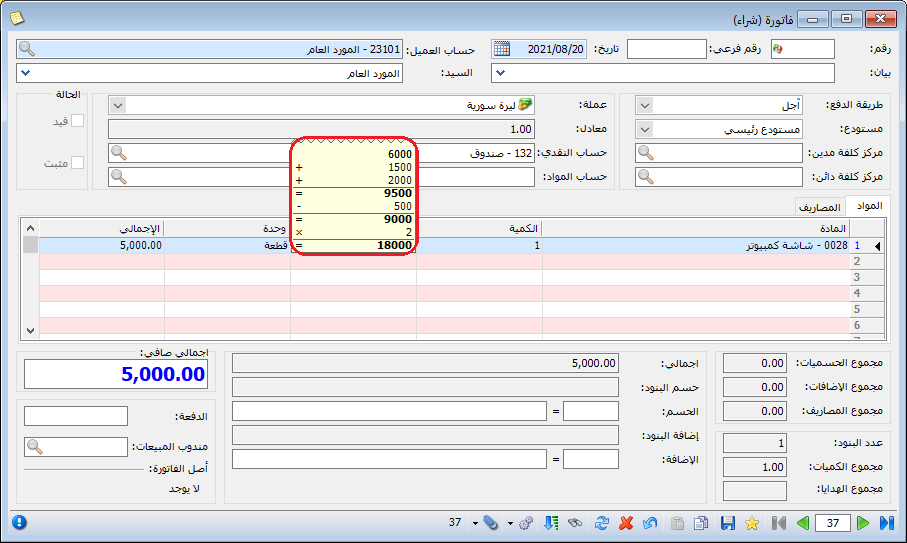
Illustration: the calculator in Al Mizan

.

See: Enter Invoice Data

Follow our YouTube channel

Share This Article

  • Facebook
  • X
  • LinkedIn
  • Pinterest
Could not find what you need? Contact us

How can we help you?

Updated on October 2, 2026
Design Page and Report Headers and FootersStart Page Settings and Panels in Al Mizan

Powered by BetterDocs

Mizan logo black1

Al Mizan .NET Accounting and Inventory: take the next step toward more effective business management

Quick Links

  • Knowledge Base
  • Privacy Policy
  • Terms and Conditions
  • Contact Us

Stay Informed

Get the latest news and offers from our website 

  • Abdurrahman Nafiz Gürman, No:05
    Güngören/İstanbul
  • +905360652643
  • info@hadarasoft.net
© 2026 Hadarasoft
Instagram Facebook-f Youtube Linkedin
Need help? Contact us