


This report classifies and groups financial transactions for a selected cost center. Its conditions window contains the following options::
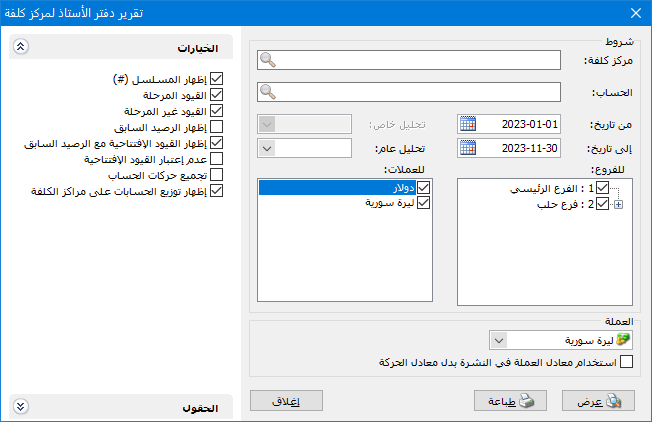
.
Conditions: #
- Cost Center: Select the cost center whose debit or credit transactions you want to review.
- Account: Select an account to review its transactions for a particular cost center. You can also select an account without specifying a cost center to display its transactions for all cost centers.
- From Date / To Date: Specify the report date range.
- Account-Specific Analysis: Select an account-specific analysis item for the account above. The cost center ledger displays transactions for that analysis item.
- General Analysis: Select a general analysis item to display its cost center ledger transactions.
Branches: #
Select one or more branches to include cost center ledger transactions from entries recorded in those branches.
Currencies: #
Select the transaction currencies to include. Transactions in unselected currencies are excluded from the selected cost center report.
- Currency: Select the currency in which the report should be displayed.
- Exchange Rate: Specify the rate relative to the base currency. This field is available only for a secondary currency and offers two choices:
- Use the Exchange-Rate Schedule: Retrieve exchange rates automatically from the schedule, using the rate applicable on each transaction date.
- Use a Specified Exchange Rate: Enter a rate in the field that appears and use it to display the report.
- Use the Scheduled Currency Rate Instead of the Transaction Rate: Use the rate from the exchange-rate schedule instead of the rate entered in the original transaction. This option is used when requesting the report in the base currency.
Fields: #
Select and arrange the fields to include as columns in the final report.
Options: #
The following options are available:
- Show Sequence Number: Enable this option to display sequential numbers for the periods shown in the report.
- Posted Entries: Include account transactions from posted entries.
- Unposted Entries: Include account transactions from unposted entries.
- Show Previous Balance: Display the previous balance when transactions exist before the requested report start date.
- Include Opening Entries in Previous Balance: Include amounts from opening entries in the previous balance.
- Ignore Opening Entries: Exclude opening entries from the report.
- Group Account Transactions: Combine similar account transactions for the same cost center.
- Show Account Allocations to Cost Centers: Include values allocated through Allocate Accounts to Cost Centers, using the percentages specified there.
Show: #
Display the report using the preceding conditions.
Print: #
Click this button to print the final report.
Close: #
Close the report conditions window.
Examples of Information Available from the Cost Center Ledger Report:
- Cost center transactions detailed by the accounts involved.
- Cost center transactions grouped by the accounts involved.
- Cost center transactions for a particular account.
- Cost center transactions within a specified period.
- Transactions for all cost centers involving a particular account.
.


