


Using the Exchange Differences Window: #
Use this window to settle account differences arising from exchange gains and losses.
When a customer or supplier agrees to transact in a currency other than the base currency, changing exchange rates can create a difference between their balance in the agreed currency and in the base currency. This window calculates the differences and generates the settlement entry automatically. Consider the following example:
Exchange Differences Example: #
Suppose the database base currency is the Syrian pound and customer Tarek agrees to transact in US dollars. The following transactions occur:
You sell goods for USD 1,000 at an illustrative exchange rate of 50 Syrian pounds per dollar. Later, Tarek sends USD 1,000 to settle the invoice, but the rate on receipt is 45 pounds per dollar. The following difference arises:
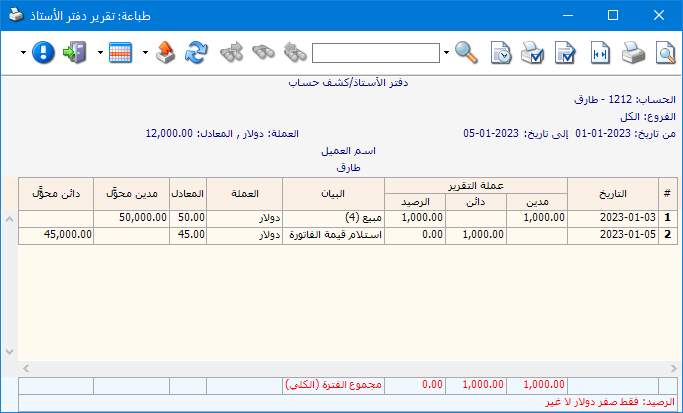
The customer balance in the agreed currency is USD 0: goods were sold for USD 1,000 and the same dollar amount was received.
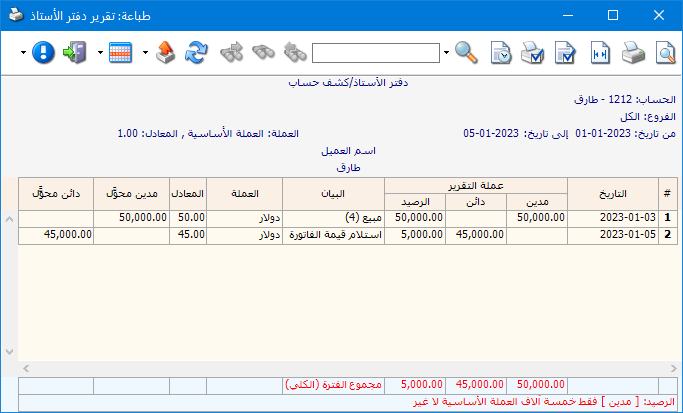
The customer balance in Syrian pounds is calculated as follows:
= (Sale: USD 1,000 × 50) − (Payment: USD 1,000 × 45)
= 50,000 − 45,000 = 5,000 Syrian pounds
A Balance Sheet or Trial Balance in the base currency therefore shows a 5,000-pound customer balance even though the dollar debt is settled. This amount represents an exchange loss arising between the sale and payment dates and must be settled.
The following ledger reports show Tarek in dollars and pounds before settlement:
Tarek General Ledger in US Dollars:
.
.
Tarek General Ledger in Syrian Pounds, showing the 5,000-pound residual exchange difference:
.
.
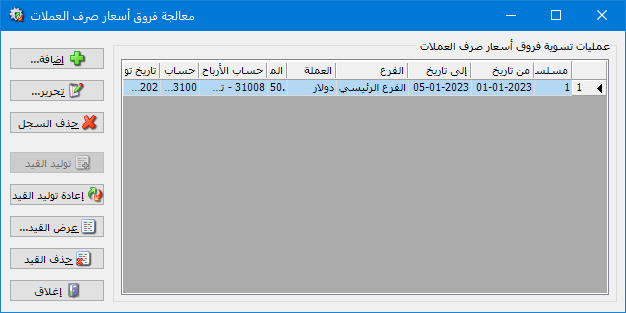
Choose Journal Entries > Manage Exchange Gains and Losses. The window displays previously generated settlement records. Click Add to create a new exchange difference entry, as shown below:
.
.
Exchange Differences Window: #
The window contains these operations:
- Add: Create an exchange difference settlement record and entry.
- Edit: Select a settlement record and click Edit to change it.
- Delete Record: Select a settlement record and click Delete Record to remove it.
- Generate Entry: If a settlement record has no entry, select it and click Generate Entry. An entry is generated when exchange differences exist.
- Regenerate Entry: After changing a settlement record or related invoices and journal entries, select the record and click Regenerate Entry to rebuild its entry.
- View Entry: Select a settlement record and click View Entry to display its entry, if one exists.
- Delete Entry: Select a settlement record and click Delete Entry to remove its generated entry while keeping the settlement record.
- Close: Close the Exchange Differences window.
Add a New Exchange Difference Settlement: #
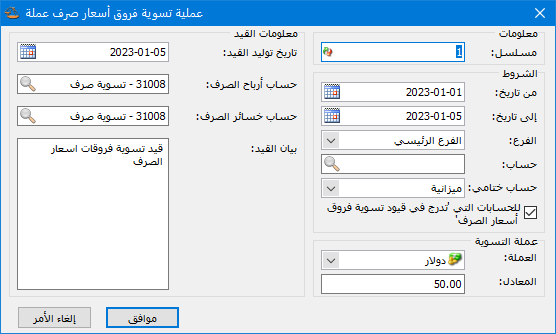
Click Add to open the exchange difference generation window containing these fields:
.
.
Sequence Number: The sequential record number.
From Date / To Date: Specify a date range to settle exchange differences for transactions within it.
Branch: Select a branch to settle differences for its transactions.
Account: Select a parent or subsidiary account to settle its exchange differences.
Closing Account: Select a closing account to settle differences for accounts assigned to it.
Currency and Exchange Rate: Select the currency to settle and its current rate relative to the base currency.
Entry Generation Date: Select the date for the settlement journal entry.
Exchange Gain Account: Select the account to which exchange gains should be posted.
Exchange Loss Account: Select the account to which exchange losses should be posted.
Entry Description: Enter the description to carry into the exchange difference entry.
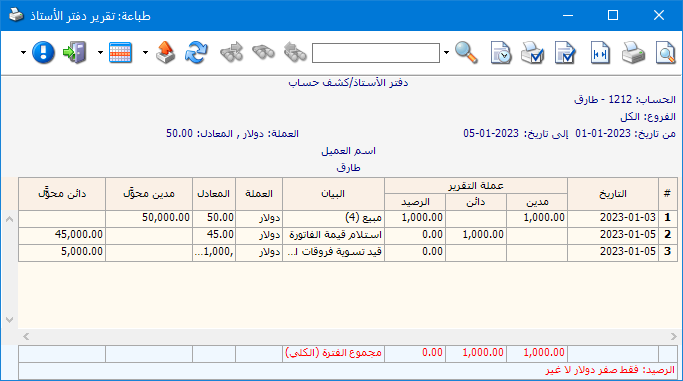
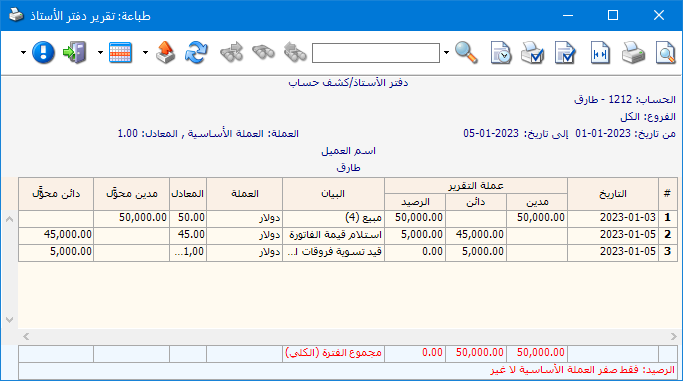
Click OK to generate the entry. Tarek ledger then appears as shown in the following two illustrations:
Tarek Dollar Statement after Exchange Settlement:
.
.
Tarek Syrian Pound Statement after Exchange Settlement:
.
.
The balances in both currencies are now zero.
Note:
For this process, enable Include in Exchange Rate Settlement Entries in the account record of the customer with whom transactions are agreed in another currency, as shown below:
.

.


