


Customer records store additional information about customer and supplier accounts, such as telephone, fax, mobile number and region. They also provide options such as blocking transactions with a customer or preventing credit sales, described below.
A customer or supplier account must also be linked to a customer record before it appears in the invoice Account field.
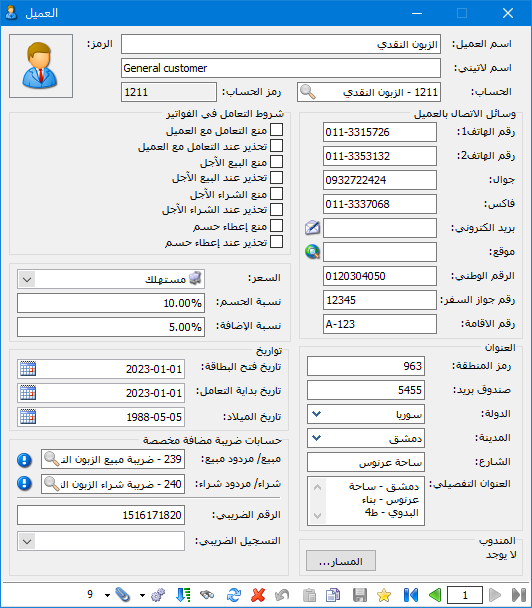
The customer record contains these fields and options:
.
.
Customer Record #
Customer Name: Enter the customer name, which may be the same as the account name or different.
Latin Name: Enter the customer name in Latin characters.
Account: Enter the account associated with the customer record.
Customer Contact Details: Enter contact information such as telephone, mobile, fax, email and website.
If an email address is entered in the customer record, exporting an Aged Receivables/Payables, General Ledger or Customer Statement report by email retrieves the customer email address automatically.
Details: #
Address: Enter address information such as postal code, PO box, country, city, street and full address.
Record Creation Date: The record creation date is inserted automatically when the customer record is created.
Business Relationship Start Date: Enter the date on which you first dealt with the customer.
Date of Birth: Enter the customer date of birth.
Prices: #
Price : Select the default selling price type, such as Retail, Special Retail, Wholesale, Semi-Wholesale, Distributor or Export.
If the invoice default price is set to Customer Record Price, selecting this customer and adding an item retrieves the item price using the price type defined in the customer record.
Discount Percentage: Enter the default customer discount percentage, which can be inserted automatically in sales or other invoices.
Surcharge Percentage: Enter the default customer surcharge percentage, which can be inserted automatically in sales or other invoices.
Custom VAT Accounts: #
Define custom VAT accounts for each customer. These include:
“Sales/ Sales Returns : A custom VAT account here applies to invoice types categorized as Sales, Sales Returns, Stock In, Stock Out, Transfer Out with Entry or Transfer Out without Entry when Calculate VAT Amount is enabled.
“Purchases / Purchase Returns: A custom VAT account here applies to invoice types categorized as Purchases, Purchase Returns, Opening Stock, Closing Stock, Transfer In with Entry or Transfer In without Entry when Calculate VAT Amount is enabled.
Note: An account specified in either field takes priority over the VAT account defined in the invoice type or item accounting group.
Tax Number: Enter the customer tax number.
Tax Registration: Select the customer tax registration information defined in the Tax Registration window. This field is intended for customers using the Saudi tax system. A separate guide explains Saudi tax registration.
Representative: Select the customer default route. When the customer is selected in an invoice, the sales representative associated with that route is retrieved automatically.
Invoice Transaction Conditions #
This section contains the following options:
- Block Transactions with Customer: Prevent saving a sales invoice for this customer.
- Warn When Dealing with Customer: Display a warning when saving an invoice for this customer, with the choice to continue or cancel.
- Block Credit Sales: Prevent saving sales invoices with a Credit payment method for this customer. Only cash invoices can be saved.
- Warn on Credit Sales: Display a warning when saving a credit sales invoice for this customer, with the choice to continue or cancel.
- Block Credit Purchases: Prevent saving purchase invoices with a Credit payment method for this customer. Only cash invoices can be saved.
- Warn on Credit Purchases: Display a warning when saving a credit purchase invoice for this customer, with the choice to continue or cancel.
- Block Discounts: Prevent saving a purchase invoice containing a discount for this customer. Only invoices without a discount can be saved.
- Warn on Discounts: Display a warning when saving an invoice containing a discount for this customer, with the choice to continue or cancel.
.


