


Sales Representatives: Journal Entry Commissions
When a company has several representatives, define them and associate them with custom entries such as receipts to identify how much each has collected. Representative pay often depends on collection performance. Choose Definitions > Sales Representative, then enter the representative name and commission calculation rules. The commission settings include:
.
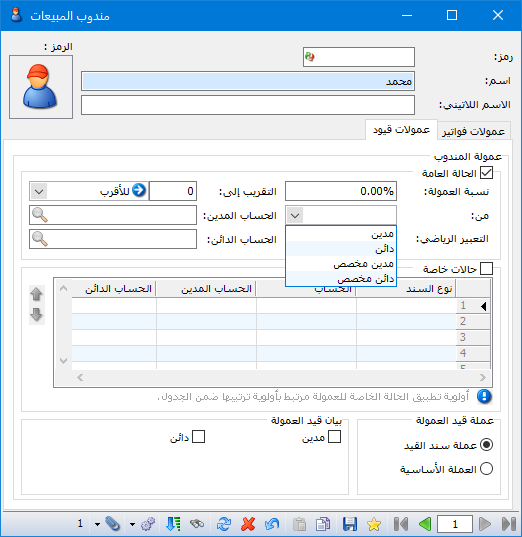
.
“General Case“: #
Enable this option to calculate commission on custom entries using Commission Percentage. Select the calculation basis in From:
“Debit : Calculate commission from the relevant account debit amount and ignore any credit amount.
“Credit : Calculate commission from the relevant account credit amount and ignore any debit amount.
“Custom Debit : Enter a formula that calculates commission from the debit amount and ignores the credit amount.
“Custom Credit : Enter a formula that calculates commission from the relevant credit amount and ignores the debit amount.
“Mathematical Expression : Define a formula for Custom Debit or Custom Credit using Debit and Credit values and arithmetic operators such as -, +, * and /.
“Round To: Configure rounding for the calculated commission.
For example, entering 10 provides these three rounding choices:
- Up: Round the commission upward to the next multiple of 10 pounds.
- Down: Round the commission downward to a multiple of 10 pounds.
- Nearest: Round the amount to the nearest multiple of 10 pounds, upward or downward.
“Debit Account : Enter the account for Representative Commission.
“Credit Account : Enter the account for Representative.
“Special Cases“: #
The company may apply different commission percentages in special cases, according to:
“Voucher Type : Select the voucher type to which a particular commission percentage applies, or leave it blank if the rule is not restricted to a voucher type.
“Account : Select the account to which a particular commission percentage applies, or leave it blank if the rule is not restricted to an account.
“Debit Account : Enter the account for Representative Commission.
“Credit Account : Enter the account for Representative.
“Commission Percentage : Enter the percentage for the special case defined by voucher type or account.
“From : Debit, Credit, Custom Debit or Custom Credit.
These are explained under General Case for representative commissions.
“Mathematical Expression : Define a formula for Custom Debit or Custom Credit using Debit and Credit values and arithmetic operators such as -, +, * and /.
“Round To and Rounding Type : These are explained under General Case for representative commissions.
“Disable : Temporarily disable the commission rule and enable it again later.
“Notes : Enter notes.
“From Date / To Date: Enter the date range during which the representative commission rule and its conditions apply.
Note: Special commission cases take priority over the general case. Their order in the table determines which special case has priority.
Commission Entry Currency: #
“Journal Voucher Currency : Calculate the representative commission in the journal voucher currency.
“Base Currency : Calculate the representative commission in the base currency, even if the voucher uses another currency.
“Commission Entry Description : Choose a description suitable for the commission entry and its selected Debit or Credit calculation basis.
Click Save, then Open New Record to add another representative.
.


