


Choose Definitions > Branch Tree. The tree initially contains one default branch, Company, with one default warehouse, Warehouse. To add a branch such as Aleppo, right-click Branch Tree and choose Add Branch. Alternatively, select Branch Tree with the left mouse button and click Branch on the upper toolbar. The new branch record opens automatically. Enter its name and select a parent branch if it belongs to another branch, or leave the parent blank for an independent branch..
Important Note: #
Independent branches let the company request closing-account reports for the company as a whole, for each branch individually or for a group of branches.
Example:
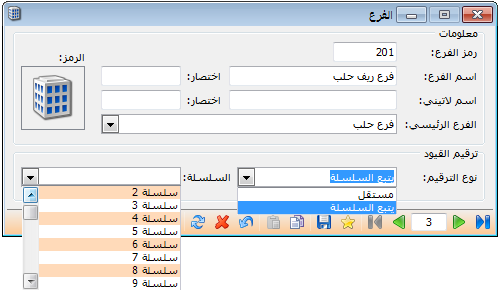
Suppose the company has a main branch and an Aleppo branch. The main branch has a main warehouse. The Aleppo branch has a warehouse and a subordinate Aleppo Countryside branch, which also has a warehouse. The branch tree and records appear as shown below. Note the difference between an independent branch record and a record for a branch under another branch.
.
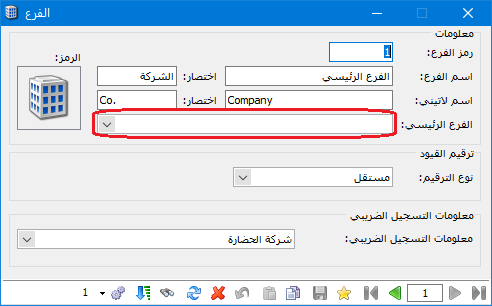
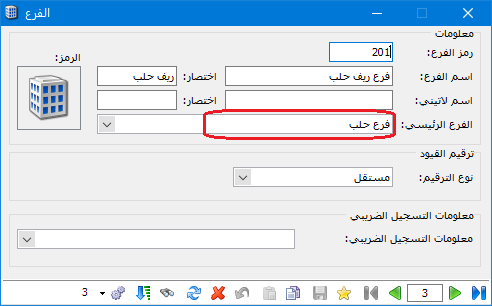
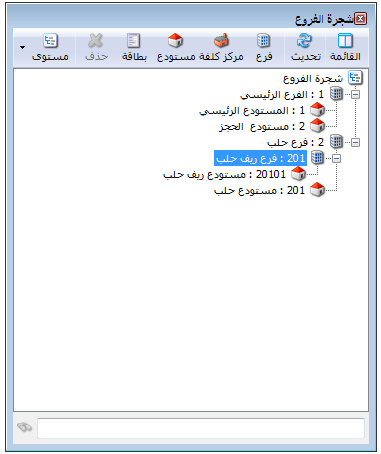
.
Notes:
- To add an independent branch, select Branch Tree and click Add Branch. To add a subordinate branch, select its parent branch and click Add Branch.
- To change a branch image, double-click the following icon in the branch record, click Add and choose the desired image.
- The same principles apply when defining warehouses, with one difference: a warehouse record also requires a main branch or main warehouse. Every warehouse must belong to a company branch; it cannot be added independently of a branch or another warehouse. If it belongs to another warehouse, it must still be associated with a company branch for accounting purposes, as shown below:
.

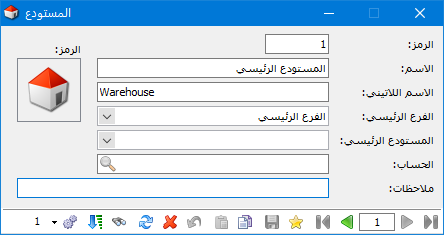
.
- The branch record provides two journal numbering methods:
Independent: Journal entry numbers in each branch start at 1 and continue sequentially for new entries within that branch.
Example: If Hadara Company has three entries in each of the preceding branches, numbering is as follows:
Company: 1, 2, 3, and so on.
Aleppo branch: 1, 2, 3, and so on.
Aleppo Countryside branch: 1, 2, 3, and so on.
.
.
Follow a Series: For example, assign the company to series 1 and the Aleppo and Aleppo Countryside branches to series 2. Numbering then becomes: #
Company: 1, 2, 3. Across the Aleppo and Aleppo Countryside branches: 1, 2, 3, 4, 5, 6.
Select the method as shown above:


