


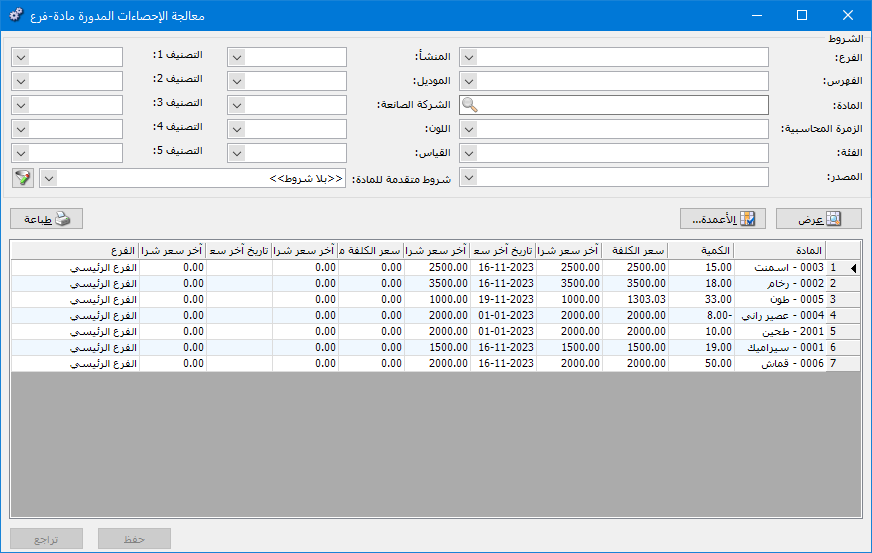
Use Carried-Forward Item–Branch Statistics to display item cost, last purchase price and last purchase date for each branch in a rolled-forward database. You can edit Carried-Forward Cost, Carried-Forward Last Price and Carried-Forward Last Price Date.
Open Items > Manage Carried-Forward Item–Branch Statistics. The window contains these options:
.
.
Conditions: #
- Branch: Select the branch whose items should be displayed.
- Category: Displays items within the selected category.
- Item: Select the item to display.
- Accounting Group: Select the accounting group for the item, category or group of items to display.
- Class: Select the item class to display.
- Source: Select the item source to display.
- Origin: Select the item origin to display.
- Model: Select the item model to display.
- Manufacturer: Select the item manufacturer to display.
- Color: Select the item color to display.
- Size: Select the item size to display.
- Classification 1 , Classification 2 , Classification 3 , Classification 4 , Classification 5: Use these fields to display items belonging to a selected classification.
- Advanced Item Conditions: Use these conditions to select items appearing in opening-stock and purchase invoices, based on information in their item records.
Note: An item must appear in an opening-stock or purchase invoice to appear in the report, even if its quantity is zero.
- Show: Display the report using the preceding conditions.
- Columns: Choose which columns appear in the report and arrange them using the two blue arrows at the upper left of the window.
Some columns are read-only, while others can be edited, such as Carried-Forward Cost, Carried-Forward Last Purchase Price and Carried-Forward Last Purchase Date.
- Print: Print the report information.
- Save: Click Save to keep changes made to the rows.
- Undo: Click Undo to discard changes made to the rows.
.


