


Skip to content
Contact Us
الميزان دوت نت للمحاسبة والمستودعات
  • Home
  • About the Software
    • About Us
    • Our Clients
  • Products
  • Services
  • Learning
    • Knowledge Base
    • Video Tutorials
  • Blog
  • Downloads
    • Al Mizan .NET
    • Updates
    • Utilities
  • العربية
  • Home
  • About the Software
    • About Us
    • Our Clients
  • Products
  • Services
  • Learning
    • Knowledge Base
    • Video Tutorials
  • Blog
  • Downloads
    • Al Mizan .NET
    • Updates
    • Utilities
  • العربية
  • Home
  • About the Software
    • About Us
    • Our Clients
  • Products
  • Services
  • Learning
    • Knowledge Base
    • Video Tutorials
  • Blog
  • Downloads
    • Al Mizan .NET
    • Updates
    • Utilities
  • العربية

User Guide

  • Knowledge Base
  • Accounting Menu
    • Chart of Accounts and Account Cards in Al Mizan
    • Define Customer and Supplier Records
    • Budgets and Their Uses
    • Account-Specific Analysis in Al Mizan
    • Transfer Account Transactions in Al Mizan
    • Account Analysis: General Analysis
    • Allocation Accounts in Al Mizan
    • Aggregate Accounts
    • Allocate Accounts to Cost Centers
    • Closing Accounts in Al Mizan
  • Accounting Reports
    • Receivables and Payables Aging Report in Al Mizan
    • Customer Balances Report in Al Mizan
    • Customer Statement Report in Al Mizan
    • General Ledger Report in Al Mizan
    • Trial Balance Report in Al Mizan
    • Most Active Customers Report
    • Inactive Customers Report in Al Mizan
    • Journal Daybook Report in Al Mizan
    • Account Transaction Analysis Report in Al Mizan
    • Budget Report
    • Monthly Account Transactions Report
    • Closing Accounts Report in Al Mizan
    • Cost Center Ledger Report
    • Permissions Report: Options and Uses
    • Chart of Accounts Report
  • Archiving
    • Archiving Module in Al Mizan .NET
  • Definitions Menu
    • Invoice Type Settings in Al Mizan
    • Sales Representative Invoice Commissions in Al Mizan
    • Cost Centers in Al Mizan
    • Define Custom Journal Vouchers in Al Mizan
    • Define Commercial Paper Types in Al Mizan
    • Sales Representatives: Journal Entry Commissions
    • Define Branch Records and Configure Their Options
    • Payment Methods in Al Mizan
    • Define the Currency Exchange-Rate Schedule
    • Define Currencies and Configure Their Options
    • Define Bank Records in Al Mizan
    • Define Warehouse Records and Configure Their Options
  • Features
    • Start Page Settings and Panels in Al Mizan
    • Database Rollover in Al Mizan
    • Processing Import Transactions
    • Use Al Mizan Functions in Excel
    • Configure Perpetual Inventory in Al Mizan
    • Define and Use an Item Independent Unit
    • Use Item Subinventory in Invoices
    • Report Toolbar Options
    • Import Items and Accounts from Excel
    • Audit Log: Options and Uses
    • Task List: Options and Uses
    • Design Page and Report Headers and Footers
    • The Calculator in Al Mizan
  • File Menu
    • Delete a Database in Al Mizan
    • Create and Restore a Database Backup
    • Create and Set Up a New Database
    • Attach Database Files
  • Financial Statements
    • Financial Statements in Al Mizan
  • Fixed Assets
    • Fixed Asset Management in Al Mizan
  • Inventory Reports
    • Detailed Invoice Transactions Report
    • Item Inventory Report: Options and Uses
    • Minimum and Maximum Item Levels Report
    • Customer Transactions by Item Report
    • Item Expiry Dates Report
    • Horizontal Item Inventory Report: Options and Uses
    • Item Transaction Analysis Report: Options and Uses
    • Free Units Inventory Report: Options and Uses
    • Total Transactions Report for Items and Categories
    • Item Transactions Report: Options and Uses
    • Monthly Item Transactions Report
    • Inactive Items Report: Options and Uses
    • Invoice Line Profit Report
    • Most Profitable Items Report
    • Most Active Items Report
    • Invoice Profit Report
    • Invoice Totals Report: Options and Uses
    • Serial Number Inventory Report
    • Item and Category Profit Report
    • Quotation Comparison Report
    • Serial Number Transaction Report
    • Item List Report in Al Mizan
  • Invoices Menu
    • Detailed Invoice Fields and Settings in Al Mizan
    • Manage Invoices
  • Items Menu
    • Item Accounting Groups in Al Mizan
    • Define Item Cards and Categories in Al Mizan
    • Item Barcode Schemas in Al Mizan
    • Invoice Operations in Al Mizan
    • Compare Warehouse Stocktakes
    • Update Item Prices
    • Carried-Forward Item–Branch Statistics
    • Carried-Forward Item–Customer Statistics
    • Manage Items in Al Mizan
    • Transfer Item Transactions
    • Minimum and Maximum Item Levels
    • Arrange Invoices in Al Mizan
    • Update Information for a Group of Items
  • Journal Entries Menu
    • Use Custom Journal Vouchers in Al Mizan
    • Process Commercial Papers in Al Mizan
    • Define and Use Commercial Papers in Al Mizan
    • Manage Currency Exchange Differences
    • Manage Custom Journal Vouchers
    • Manage Journal Vouchers in Al Mizan
    • Journal Operations in Al Mizan
    • Enter Journal Data and Configure Entry Settings
  • Manufacturing
    • Manufacturing Management in Al Mizan
  • Orders
    • Order Management in Al Mizan
  • Permissions Menu
    • Permissions: Options and Uses
    • Posting Policies in Al Mizan
    • Field Permissions in Al Mizan
    • Confidentiality Levels and Password Changes
  • Point of Sale
    • Point of Sale in Al Mizan
  • Real Estate
    • Real Estate Management in Al Mizan
  • Tools Menu
    • General Program Settings in Al Mizan .NET
    • Print Designer in Al Mizan
    • Advanced Print Designer Properties
    • Manage Print Design Groups
  • Training Courses
    • Training Course Management in Al Mizan
Show Categories
  • Home
  • Knowledge Base
  • User Guide
  • Tools Menu
  • Manage Print Design Groups

Manage Print Design Groups

Create a main design containing several print designs in the Manage Design Groups window. Printing the main design prints the record in all its component designs together with one click, saving the effort of printing each separately. You can also choose the page and printer for each design.

Choose Tools > Manage Design Groups. Click Add, then enter the design group name and the type of designs it contains, as shown below:
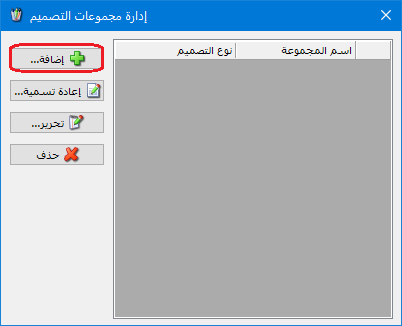
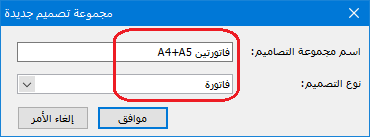
Illustration: managing print design groups

.

Select the design group and click Edit, as shown below:
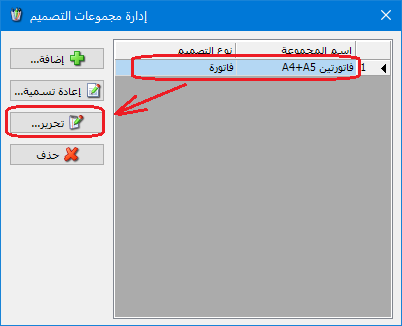
Illustration: managing print design groups

.

In the following window, click Add to select component designs for the group:
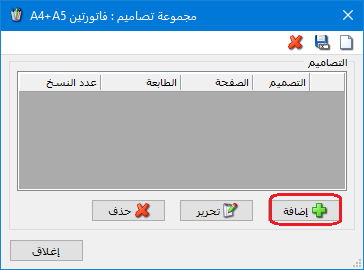
Illustration: managing print design groups

.

Select the print design, its page, printer and number of copies. You can also specify print conditions and filter conditions, as shown below:
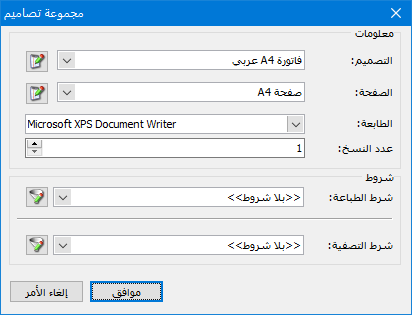
Illustration: managing print design groups

.

Add other designs in the same way. The design group window then contains the following designs:
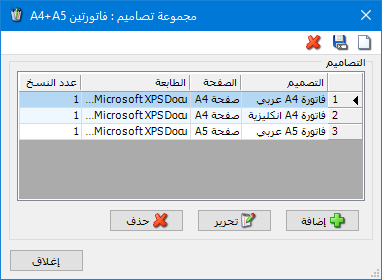
Illustration: managing print design groups

.

To remove a design from the group, select it and click Delete. Click Edit to change its settings, or Add to include another design. To print the group, choose Operations > Print Custom Invoice from the invoice, enable Multiple Printing and select the previously defined Design Group, as shown below:
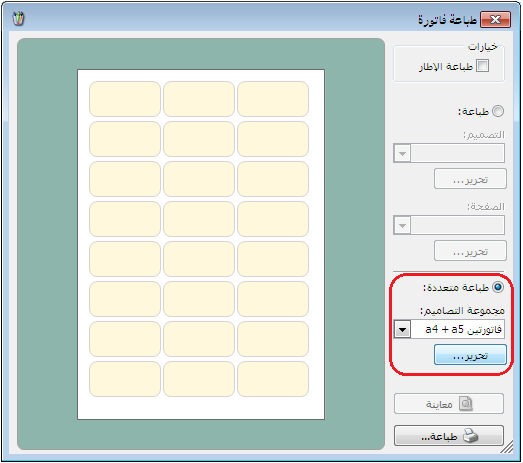
Illustration: managing print design groups

.

See: Print Designer

Follow our YouTube channel

Share This Article

  • Facebook
  • X
  • LinkedIn
  • Pinterest
Could not find what you need? Contact us

How can we help you?

Updated on October 2, 2026
Advanced Print Designer PropertiesGeneral Program Settings in Al Mizan .NET

Powered by BetterDocs

Mizan logo black1

Al Mizan .NET Accounting and Inventory: take the next step toward more effective business management

Quick Links

  • Knowledge Base
  • Privacy Policy (Arabic)
  • Terms and Conditions (Arabic)
  • Contact Us

Stay Informed

Get the latest news and offers from our website 

  • Abdurrahman Nafiz Gürman, No:05
    Güngören/İstanbul
  • +905360652643
  • info@hadarasoft.net
© 2026 Hadarasoft
Instagram Facebook-f Youtube
Need help? Contact us