


Skip to content
Contact Us
الميزان دوت نت للمحاسبة والمستودعات
  • Home
  • About the Software
    • About Us
    • Our Clients
  • Products
  • Services
  • Learning
    • Knowledge Base
    • Video Tutorials
  • Blog
  • Downloads
    • Al Mizan .NET
    • Updates
    • Utilities
  • العربية
  • Home
  • About the Software
    • About Us
    • Our Clients
  • Products
  • Services
  • Learning
    • Knowledge Base
    • Video Tutorials
  • Blog
  • Downloads
    • Al Mizan .NET
    • Updates
    • Utilities
  • العربية
  • Home
  • About the Software
    • About Us
    • Our Clients
  • Products
  • Services
  • Learning
    • Knowledge Base
    • Video Tutorials
  • Blog
  • Downloads
    • Al Mizan .NET
    • Updates
    • Utilities
  • العربية
Show Categories
  • Home
  • Knowledge Base
  • User Guide
  • Journal Entries Menu
  • Journal Operations in Al Mizan

Journal Operations in Al Mizan

Choose Journal Entries > Journal Operations. The window contains the following main operations:

.
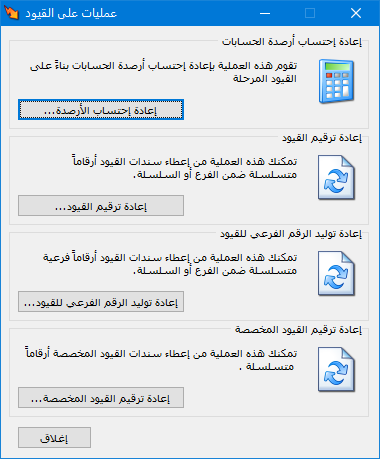
Illustration: journal operations in Al Mizan

.

Recalculate Balances: #

Recalculate account balances from posted journal entries. This operation also recalculates costs when costing problems result from invoices being entered out of chronological order or from changes to invoice order.

Click Recalculate Balances, then select the accounting period and branches to recalculate, as shown below:

.
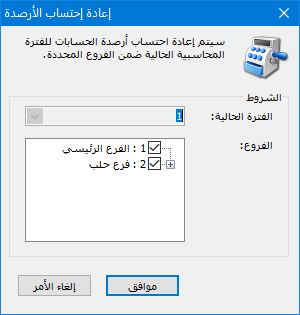
Illustration: recalculating balances

.

Renumber Journal Entries:

Renumber entries for a branch with independent numbering or for a numbering series. Select the branch or series, and optionally restrict the operation by entry dates or numbers if you want to renumber only part of the entries.

.
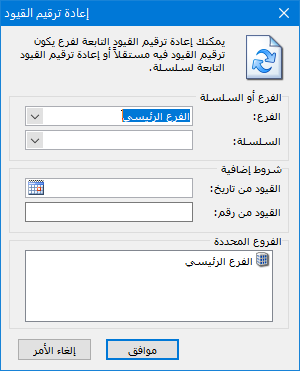
Illustration: recalculating balances

.

Regenerate Secondary Journal Numbers: #

Similarly, regenerate secondary entry numbers for a branch with independent numbering or for a series. Select the secondary numbering series and journal voucher source type. For example, regenerate secondary numbers only for entries originating from invoices. The following illustration shows the relevant window: #

.
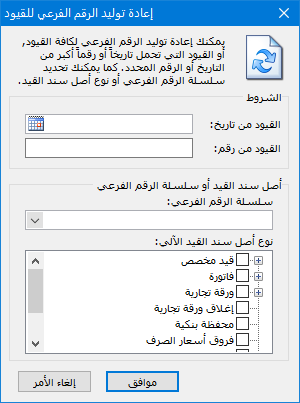
Illustration: regenerating secondary journal numbers

.

Renumber Custom Journal Entries: #

Use this window to renumber custom entries. Select the custom entry types and optionally restrict the operation by entry dates or numbers. 

.
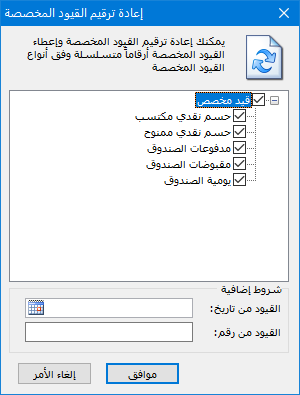
Illustration: renumbering custom journal entries

.

See: Enter Journal Data

Follow our YouTube channel

Share This Article

  • Facebook
  • X
  • LinkedIn
  • Pinterest
Could not find what you need? Contact us

How can we help you?

Updated on October 2, 2026
Manage Journal Vouchers in Al MizanEnter Journal Data and Configure Entry Settings

Powered by BetterDocs

Contents
  • Recalculate Balances:
  • Regenerate Secondary Journal Numbers:
    • Similarly, regenerate secondary entry numbers for a branch with independent numbering or for a series. Select the secondary numbering series and journal voucher source type. For example, regenerate secondary numbers only for entries originating from invoices. The following illustration shows the relevant window:
  • Renumber Custom Journal Entries:
Mizan logo black1

Al Mizan .NET Accounting and Inventory: take the next step toward more effective business management

Quick Links

  • Knowledge Base
  • Privacy Policy
  • Terms and Conditions
  • Contact Us

Stay Informed

Get the latest news and offers from our website 

  • Abdurrahman Nafiz Gürman, No:05
    Güngören/İstanbul
  • +905360652643
  • info@hadarasoft.net
© 2026 Hadarasoft
Instagram Facebook-f Youtube Linkedin
Need help? Contact us