


Skip to content
Contact Us
الميزان دوت نت للمحاسبة والمستودعات
  • Home
  • About the Software
    • About Us
    • Our Clients
  • Products
  • Services
  • Learning
    • Knowledge Base
    • Video Tutorials
  • Blog
  • Downloads
    • Al Mizan .NET
    • Updates
    • Utilities
  • العربية
  • Home
  • About the Software
    • About Us
    • Our Clients
  • Products
  • Services
  • Learning
    • Knowledge Base
    • Video Tutorials
  • Blog
  • Downloads
    • Al Mizan .NET
    • Updates
    • Utilities
  • العربية
  • Home
  • About the Software
    • About Us
    • Our Clients
  • Products
  • Services
  • Learning
    • Knowledge Base
    • Video Tutorials
  • Blog
  • Downloads
    • Al Mizan .NET
    • Updates
    • Utilities
  • العربية
Show Categories
  • Home
  • Knowledge Base
  • User Guide
  • Inventory Reports
  • Item List Report in Al Mizan

Item List Report in Al Mizan

Print a list of items defined in the database and include any relevant information from their item records. Choose Reports > Item List to open the conditions window containing the following fields:
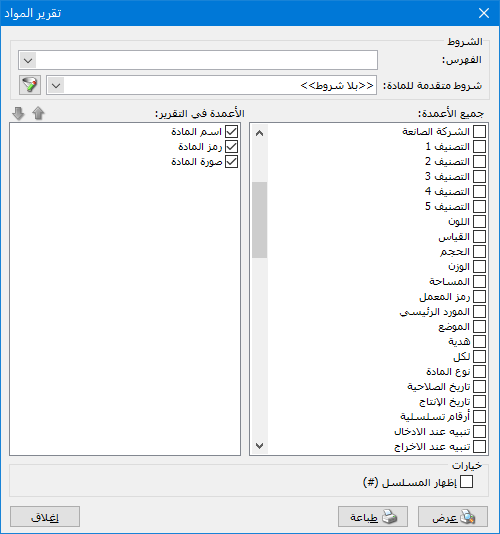
Illustration: the item list report

.

The window contains these options:

Conditions: #

  • Category: Select an item category to display items within it.
  • Advanced Item Conditions: Specify an advanced condition to display matching items.

All Columns: #

Available fields, such as Item Code, Item Name and Specifications, appear on the right. Enabling a field adds it to Report Columns on the left. Arrange the selected fields using the blue arrows in the left corner, as shown below:
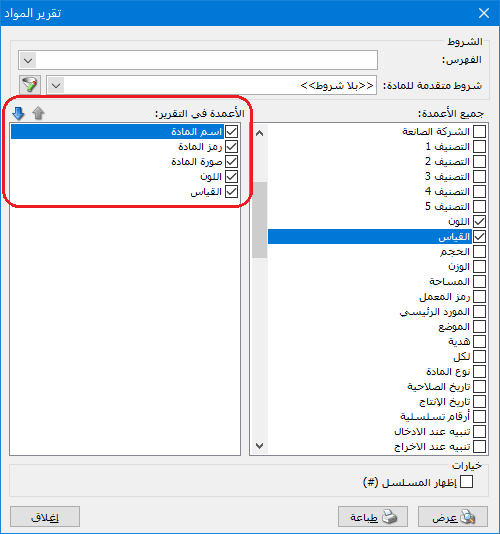
Illustration: All Columns

.

Options: #

Show Sequence Number: Enable this option to display sequential numbers for items in the report.

  • Show: Display the report.
  • Print: Print the report.
  • Close: Close the report.

The following example shows information displayed in this report:
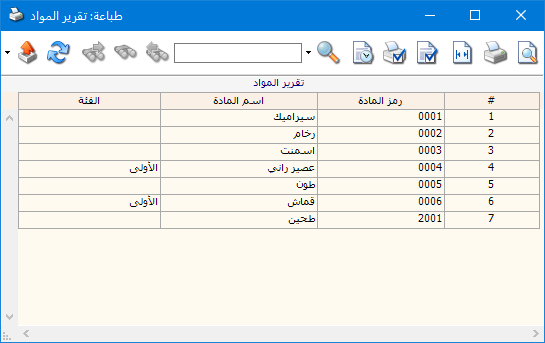
Illustration: report options

.

Examples of Information Available from the Item List Report:

  • All defined items showing each item name, code, first unit and retail price for that unit.
  • A list of defined item names with sequential row numbers.

.

See: Manage Items

Follow our YouTube channel

Share This Article

  • Facebook
  • X
  • LinkedIn
  • Pinterest
Could not find what you need? Contact us

How can we help you?

Updated on October 2, 2026
Serial Number Transaction ReportDetailed Invoice Transactions Report

Powered by BetterDocs

Contents
  • Conditions:
  • All Columns:
  • Options:
Mizan logo black1

Al Mizan .NET Accounting and Inventory: take the next step toward more effective business management

Quick Links

  • Knowledge Base
  • Privacy Policy
  • Terms and Conditions
  • Contact Us

Stay Informed

Get the latest news and offers from our website 

  • Abdurrahman Nafiz Gürman, No:05
    Güngören/İstanbul
  • +905360652643
  • info@hadarasoft.net
© 2026 Hadarasoft
Instagram Facebook-f Youtube Linkedin
Need help? Contact us