


Skip to content
Contact Us
الميزان دوت نت للمحاسبة والمستودعات
  • Home
  • About the Software
    • About Us
    • Our Clients
  • Products
  • Services
  • Learning
    • Knowledge Base
    • Video Tutorials
  • Blog
  • Downloads
    • Al Mizan .NET
    • Updates
    • Utilities
  • العربية
  • Home
  • About the Software
    • About Us
    • Our Clients
  • Products
  • Services
  • Learning
    • Knowledge Base
    • Video Tutorials
  • Blog
  • Downloads
    • Al Mizan .NET
    • Updates
    • Utilities
  • العربية
  • Home
  • About the Software
    • About Us
    • Our Clients
  • Products
  • Services
  • Learning
    • Knowledge Base
    • Video Tutorials
  • Blog
  • Downloads
    • Al Mizan .NET
    • Updates
    • Utilities
  • العربية
Show Categories
  • Home
  • Knowledge Base
  • User Guide
  • Features
  • Design Page and Report Headers and Footers

Design Page and Report Headers and Footers

 Choose Reports > Report Settings, then select Page Header, Page Footer, Report Header or Report Footer to design the relevant section.

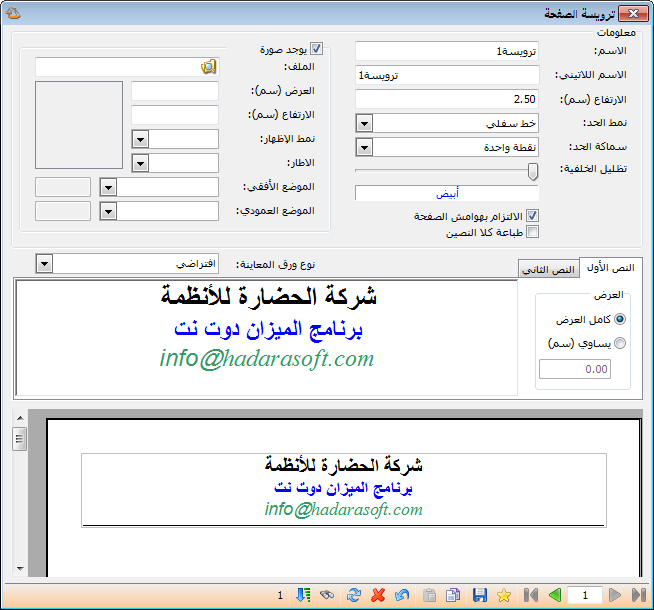
For example, selecting Page Header opens the following window, where you can design a header to appear on every report page. Alternatively, design the header in Word, copy it and paste it into the header area in this window. The window contains these fields:
0142- P-121

.

Information #

  • Name: Enter the header name in Arabic.
  • Latin Name: Enter the header name in English.
  • Height: Specify the header height along the printed page, in centimeters.
  • Border Style: Choose a top line, bottom line, both lines or a frame for the header.
  • Border Thickness: Set the thickness of the line or frame selected above.
  • Background Shading: Set the header background color using the control in this field.
  • Include Image: Enable this option to print a company logo or another image in the header. Then specify the image file location, width, height, border, horizontal and vertical position, and other image settings.

.

See: Configure Software Settings

Follow our YouTube channel

Share This Article

  • Facebook
  • X
  • LinkedIn
  • Pinterest
Could not find what you need? Contact us

How can we help you?

Updated on October 2, 2026
Task List: Options and UsesThe Calculator in Al Mizan

Powered by BetterDocs

Contents
  • Information
Mizan logo black1

Al Mizan .NET Accounting and Inventory: take the next step toward more effective business management

Quick Links

  • Knowledge Base
  • Privacy Policy
  • Terms and Conditions
  • Contact Us

Stay Informed

Get the latest news and offers from our website 

  • Abdurrahman Nafiz Gürman, No:05
    Güngören/İstanbul
  • +905360652643
  • info@hadarasoft.net
© 2026 Hadarasoft
Instagram Facebook-f Youtube Linkedin
Need help? Contact us