


Skip to content
Contact Us
الميزان دوت نت للمحاسبة والمستودعات
  • Home
  • About the Software
    • About Us
    • Our Clients
  • Products
  • Services
  • Learning
    • Knowledge Base
    • Video Tutorials
  • Blog
  • Downloads
    • Al Mizan .NET
    • Updates
    • Utilities
  • العربية
  • Home
  • About the Software
    • About Us
    • Our Clients
  • Products
  • Services
  • Learning
    • Knowledge Base
    • Video Tutorials
  • Blog
  • Downloads
    • Al Mizan .NET
    • Updates
    • Utilities
  • العربية
  • Home
  • About the Software
    • About Us
    • Our Clients
  • Products
  • Services
  • Learning
    • Knowledge Base
    • Video Tutorials
  • Blog
  • Downloads
    • Al Mizan .NET
    • Updates
    • Utilities
  • العربية
Show Categories
  • Home
  • Knowledge Base
  • User Guide
  • Permissions Menu
  • Field Permissions in Al Mizan

Field Permissions in Al Mizan

Field Permissions #

Al Mizan .NET Accounting and Inventory provides flexible permissions at field level. In addition to permissions for windows and the operations performed within them, you can specify which fields a user may view or edit. This allows more precise control over access within each window.

Consider the following example:: #

Suppose the user Tarek has permission to open sales invoices, but you also want to prevent him from changing sales prices. Sign in as the system administrator, open the sales invoice window and choose Operations > Field Permissions, as shown below:
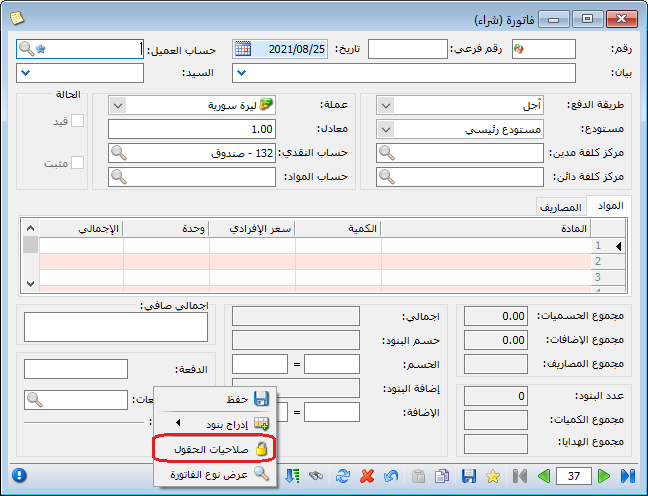
Illustration: the field permissions example

.

In the window, select Tarek in User Group. Enable the fields he may access and disable those he may not view. You can also specify exactly which operations he may perform on each field. In this example, remove permission to edit Unit Price, Total Price, Discount Percentage and Discount Amount. These fields are under Invoice Lines, as shown below:
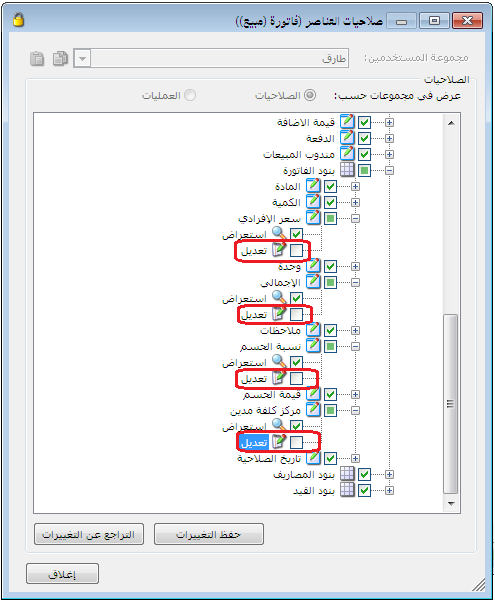
Illustration: the field permissions example

.

After signing in as Tarek and reopening the sales invoice window, Unit Price, Total Price, Discount Percentage and Discount Amount appear as read-only fields and cannot be edited, as shown below:
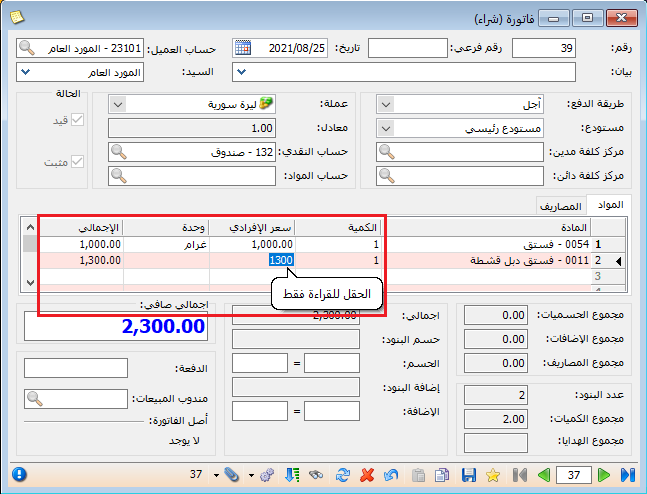
Illustration: the field permissions example

.

See: Confidentiality Levels

Follow our YouTube channel

Share This Article

  • Facebook
  • X
  • LinkedIn
  • Pinterest
Could not find what you need? Contact us

How can we help you?

Updated on October 2, 2026
Posting Policies in Al MizanConfidentiality Levels and Password Changes

Powered by BetterDocs

Contents
  • Field Permissions
  • Consider the following example::
Mizan logo black1

Al Mizan .NET Accounting and Inventory: take the next step toward more effective business management

Quick Links

  • Knowledge Base
  • Privacy Policy
  • Terms and Conditions
  • Contact Us

Stay Informed

Get the latest news and offers from our website 

  • Abdurrahman Nafiz Gürman, No:05
    Güngören/İstanbul
  • +905360652643
  • info@hadarasoft.net
© 2026 Hadarasoft
Instagram Facebook-f Youtube Linkedin
Need help? Contact us