


Skip to content
Contact Us
الميزان دوت نت للمحاسبة والمستودعات
  • Home
  • About the Software
    • About Us
    • Our Clients
  • Products
  • Services
  • Learning
    • Knowledge Base
    • Video Tutorials
  • Blog
  • Downloads
    • Al Mizan .NET
    • Updates
    • Utilities
  • العربية
  • Home
  • About the Software
    • About Us
    • Our Clients
  • Products
  • Services
  • Learning
    • Knowledge Base
    • Video Tutorials
  • Blog
  • Downloads
    • Al Mizan .NET
    • Updates
    • Utilities
  • العربية
  • Home
  • About the Software
    • About Us
    • Our Clients
  • Products
  • Services
  • Learning
    • Knowledge Base
    • Video Tutorials
  • Blog
  • Downloads
    • Al Mizan .NET
    • Updates
    • Utilities
  • العربية
Show Categories
  • Home
  • Knowledge Base
  • User Guide
  • Accounting Reports
  • Permissions Report: Options and Uses

Permissions Report: Options and Uses

This report lets the system administrator review permissions for each user or user group, and identify users with the same permissions. It contains the following sections:
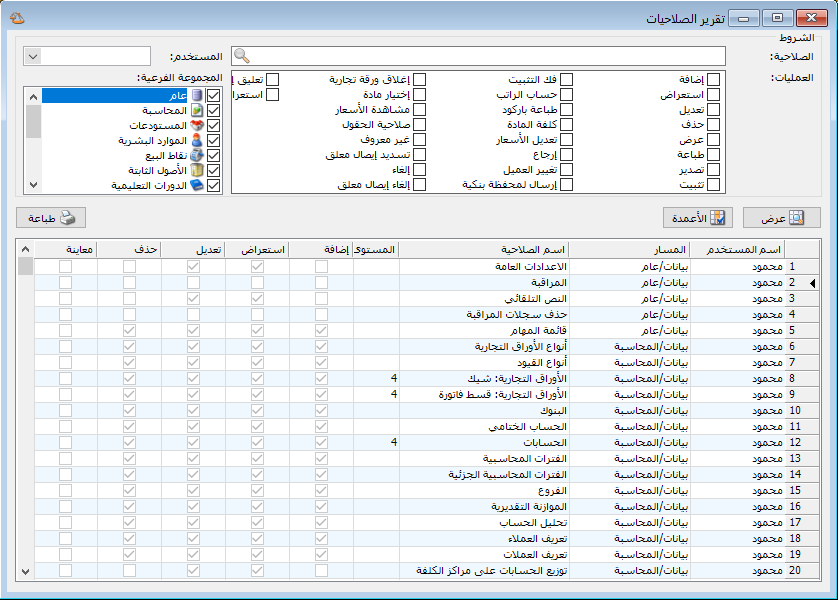
Illustration: the permissions report

.

Conditions: #

  • Permission: Select the permission whose authorized users you want to display. When selecting a permission, also specify the subgroup to which it belongs.
  • Operations: Each permission includes operations. Some are specific, such as undoing invoice finalization or viewing item cost in an item record. Others are common, such as Add, View, Edit and Delete. Selecting operations helps identify users authorized to perform those particular operations.
  • User: Select a defined user or user group to display its available permissions and operations.
  • Subgroup: Select subgroups to display the users and user groups with permissions for them.

Show: #

After setting the conditions, click Show.

Columns: #

Select which columns appear and arrange their order using the two blue arrows at the top of the columns list.

Print: #

Click this button to print the final report.

.

See: Software Settings

Follow our YouTube channel

Share This Article

  • Facebook
  • X
  • LinkedIn
  • Pinterest
Could not find what you need? Contact us

How can we help you?

Updated on October 2, 2026
Cost Center Ledger ReportChart of Accounts Report

Powered by BetterDocs

Contents
  • Conditions:
  • Show:
  • Columns:
  • Print:
Mizan logo black1

Al Mizan .NET Accounting and Inventory: take the next step toward more effective business management

Quick Links

  • Knowledge Base
  • Privacy Policy
  • Terms and Conditions
  • Contact Us

Stay Informed

Get the latest news and offers from our website 

  • Abdurrahman Nafiz Gürman, No:05
    Güngören/İstanbul
  • +905360652643
  • info@hadarasoft.net
© 2026 Hadarasoft
Instagram Facebook-f Youtube Linkedin
Need help? Contact us