


Skip to content
Contact Us
الميزان دوت نت للمحاسبة والمستودعات
  • Home
  • About the Software
    • About Us
    • Our Clients
  • Products
  • Services
  • Learning
    • Knowledge Base
    • Video Tutorials
  • Blog
  • Downloads
    • Al Mizan .NET
    • Updates
    • Utilities
  • العربية
  • Home
  • About the Software
    • About Us
    • Our Clients
  • Products
  • Services
  • Learning
    • Knowledge Base
    • Video Tutorials
  • Blog
  • Downloads
    • Al Mizan .NET
    • Updates
    • Utilities
  • العربية
  • Home
  • About the Software
    • About Us
    • Our Clients
  • Products
  • Services
  • Learning
    • Knowledge Base
    • Video Tutorials
  • Blog
  • Downloads
    • Al Mizan .NET
    • Updates
    • Utilities
  • العربية
Show Categories
  • Home
  • Knowledge Base
  • User Guide
  • Accounting Menu
  • Account-Specific Analysis in Al Mizan

Account-Specific Analysis in Al Mizan

Account-specific analysis breaks an account into detailed components without adding subaccounts to the main chart of accounts. It enables detailed expense and income reports. To define account-specific analysis, open theAccount Recordand select Account-Specific Analysis.

For example, a Miscellaneous Expenses account may include donations, transport and meals. Instead of defining a subaccount for each expense, use account-specific analysis to identify each component when needed, as shown below:

.
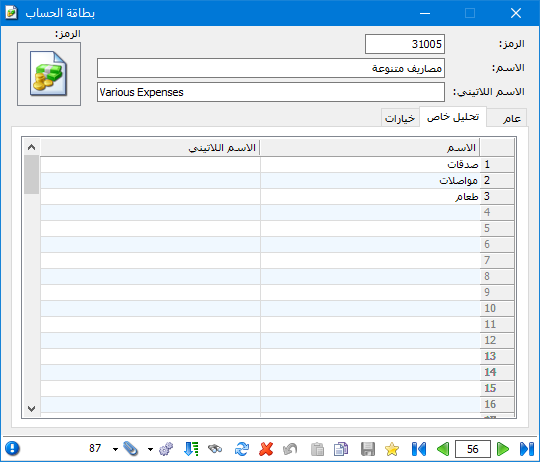
Illustration: account-specific analysis in Al Mizan

.

Add an Account-Specific Analysis column to the journal entry. When paying 22,500 Syrian pounds in miscellaneous expenses, split the amount in the entry according to the analysis items defined in the account record, as shown below:

.
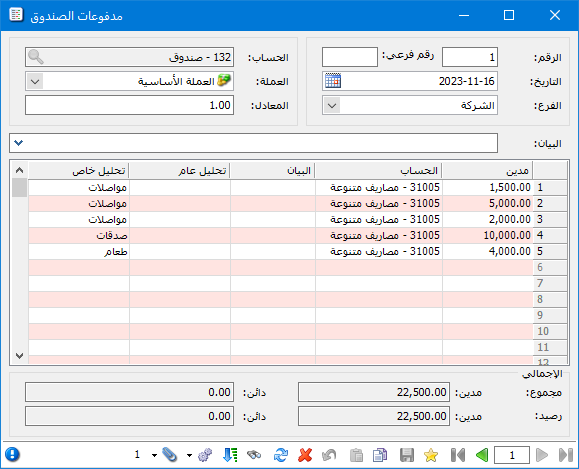
Illustration: account-specific analysis in Al Mizan

.
To find total donations in the general ledger report, enter Miscellaneous Expenses in Account and Donations in Account-Specific Analysis, as shown below:

.
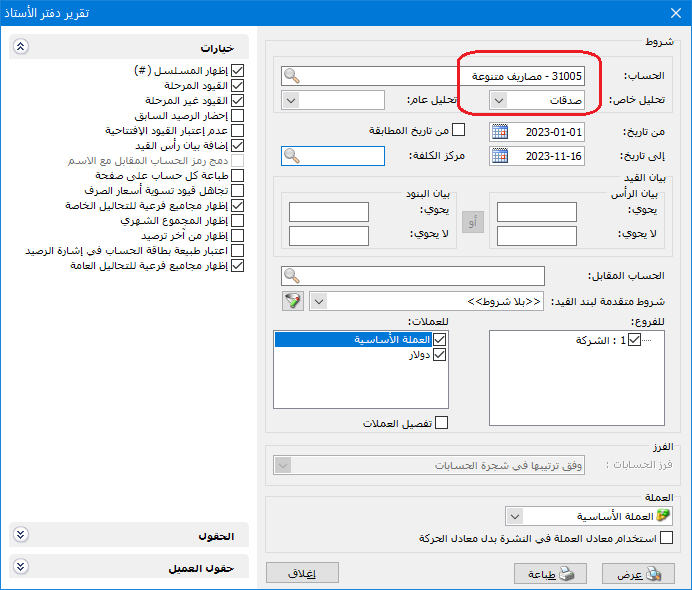
Illustration: account-specific analysis in Al Mizan

.

 The following report is produced:

.
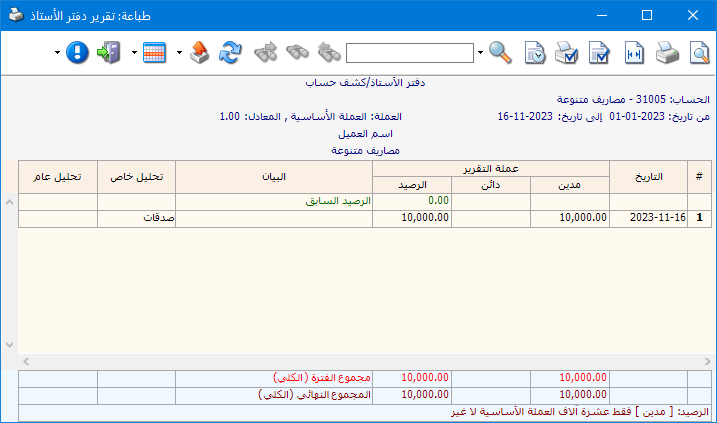
Illustration: account-specific analysis in Al Mizan

.

You can also enable Show Subtotals for Account-Specific Analyses in the general ledger report. Totals for each analysis item of the selected account then appear at the bottom of the report, as shown below:

.
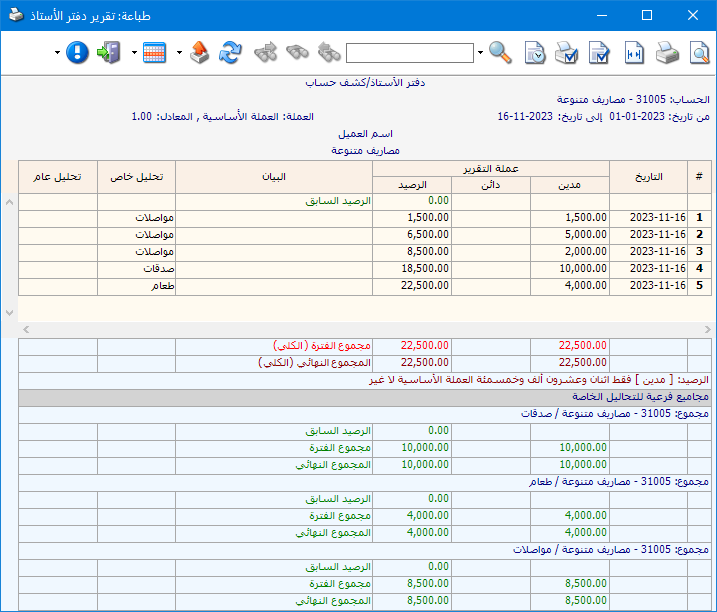
Illustration: account-specific analysis in Al Mizan

.

Note: Account-specific analysis belongs to one particular account and cannot be requested independently of it. In the example, you cannot request Donations without also specifying its parent account, Miscellaneous Expenses.

.

Follow our YouTube channel

Share This Article

  • Facebook
  • X
  • LinkedIn
  • Pinterest
Could not find what you need? Contact us

How can we help you?

Updated on October 2, 2026
Budgets and Their UsesTransfer Account Transactions in Al Mizan

Powered by BetterDocs

Mizan logo black1

Al Mizan .NET Accounting and Inventory: take the next step toward more effective business management

Quick Links

  • Knowledge Base
  • Privacy Policy
  • Terms and Conditions
  • Contact Us

Stay Informed

Get the latest news and offers from our website 

  • Abdurrahman Nafiz Gürman, No:05
    Güngören/İstanbul
  • +905360652643
  • info@hadarasoft.net
© 2026 Hadarasoft
Instagram Facebook-f Youtube Linkedin
Need help? Contact us