


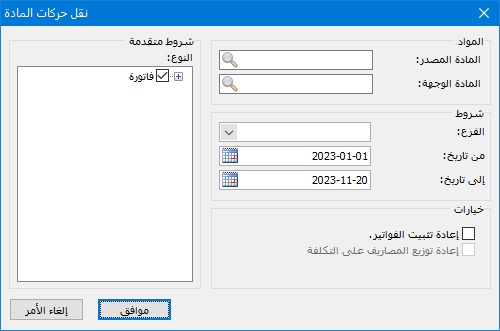
This window transfers transactions from one item to another. It saves time when there are many transactions and lets you select which types to transfer. For example, transfer only sales invoices for a particular item or only purchase invoices. You can also restrict transfers to a date range or to warehouses within a particular branch. Open Items > Transfer Item Transactions. The window contains these options:
.
.
Items #
Source Item: The item from which transactions will be transferred.
Destination Item: The item to which transactions will be transferred.
Conditions #
Branch: Select a company branch to transfer only transactions recorded in warehouses within that branch.
From Date / To Date: Specify the date range. Only transactions within that period are transferred.
Advanced Conditions #
Type: Select a data type to transfer only transactions of that type, such as purchase invoices or sales invoices.
Options #
Re-finalize Invoices / Reallocate Expenses to Cost: Enable this option to re-finalize invoices after the transfer. This recalculates item costs, sales invoice profits and item profits, and corrects related costing issues.
Note:
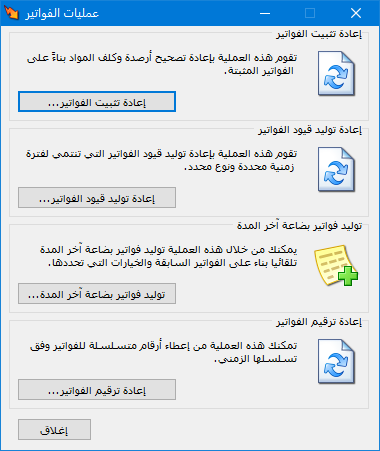
If you forgot to enable this option during an item transfer, open Items > Invoice Operations, choose Re-finalize Invoices and click OK, as shown below:
.
.


