


You can group accounts from the chart of accounts regardless of their nature or parent account. Accounting reports can then display combined results, such as a general ledger report for an aggregate account containing the selected component accounts.
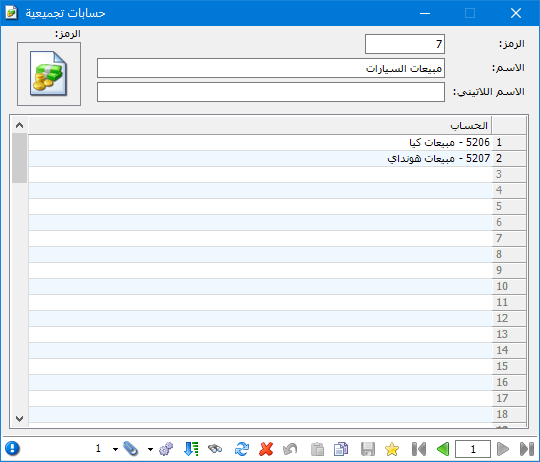
Choose Accounting > Aggregate Accounts to define an aggregate account. Add the component accounts under an aggregate parent and specify their relationships, as shown below:
.
.
In the window, enter an aggregate account name and select its component accounts from the chart of accounts. For example, suppose Kia and Hyundai vehicle sales have separate sales accounts and you want to see their combined sales. Define an aggregate account as shown below:
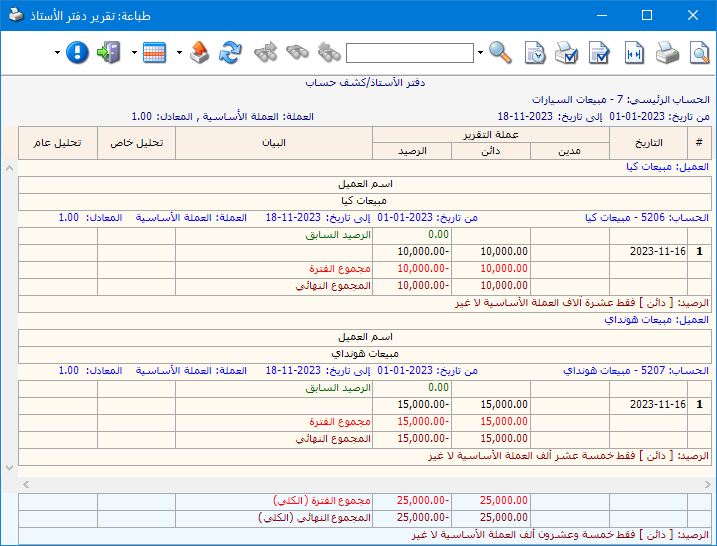
Request the general ledger for the new Vehicle Sales aggregate account to obtain the following report:
.
.


