


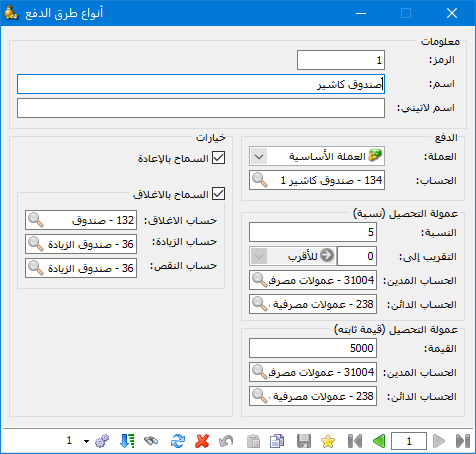
Define payment methods for sending or receiving money through invoices and point of sale. Choose Definitions > Payment Method Types to open the window shown above, which contains these fields:
Information: #
Code: The record code.
Name: The payment method name in Arabic.
Latin Name: The payment method name in Latin characters.
Payment: #
Currency: The currency used for payment.
Account: The account to which paid amounts are posted.
Collection Fee Percentage: #
Enter the percentage fee charged for this payment method, where applicable. Credit card payments are a common example, as shown above.
Round To: Enter the increment to which the calculated amount should be rounded, and select rounding up, down or to the nearest increment.
Collection Fee: Contains the following:
Debit Account: Enter the collection fee debit account, usually the fee expense account.
Credit Account: Enter the collection fee credit account, usually a fee payable account or a bank account.
Fixed Amount: Enter any fixed fee charged for this payment method. Credit cards are a common example.
Debit and Credit Accounts: These work in the same way as the accounts used for percentage collection fees.
Allow Refunds: Enable this option to permit refunds through the defined payment method.
Allow Closing: Enable this option to transfer amounts posted to the default payment method account automatically to the closing account.
Closing Accounts: Enter the account used to close the payment method account to which paid amounts are posted.
Cash Surplus Account: Enter the account used to record a surplus in the point-of-sale cash drawer.
Cash Shortage Account: Enter the account used to record a shortage in the point-of-sale cash drawer.
.
.


