


Skip to content
Contact Us
الميزان دوت نت للمحاسبة والمستودعات
  • Home
  • About the Software
    • About Us
    • Our Clients
  • Products
  • Services
  • Learning
    • Knowledge Base
    • Video Tutorials
  • Blog
  • Downloads
    • Al Mizan .NET
    • Updates
    • Utilities
  • العربية
  • Home
  • About the Software
    • About Us
    • Our Clients
  • Products
  • Services
  • Learning
    • Knowledge Base
    • Video Tutorials
  • Blog
  • Downloads
    • Al Mizan .NET
    • Updates
    • Utilities
  • العربية
  • Home
  • About the Software
    • About Us
    • Our Clients
  • Products
  • Services
  • Learning
    • Knowledge Base
    • Video Tutorials
  • Blog
  • Downloads
    • Al Mizan .NET
    • Updates
    • Utilities
  • العربية
Show Categories
  • Home
  • Knowledge Base
  • User Guide
  • File Menu
  • Create and Restore a Database Backup

Create and Restore a Database Backup

Create a Backup: #

You can create a database backup in either of the two ways shown below:
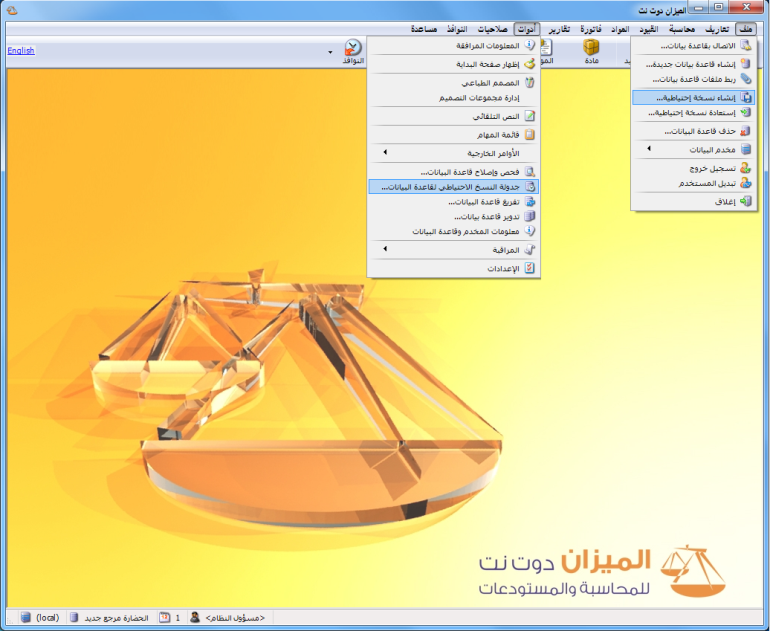
Illustration: creating a backup

Manual Method: #

Choose File > Create Backup. In the window that appears, enter the backup location, the name under which the database backup will be saved and a description. Click OK to create the backup, as shown below:
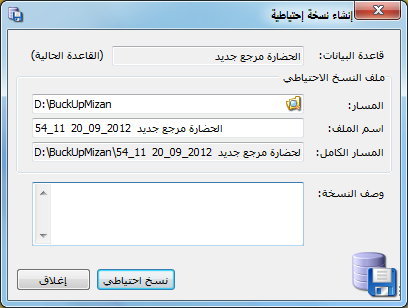
Illustration: manual backup

Automatic Method: #

Automatic backups can run at scheduled times throughout the day, daily, weekly or monthly. Choose Tools > Schedule Database Backup to configure automatic backups. The window contains the following options:
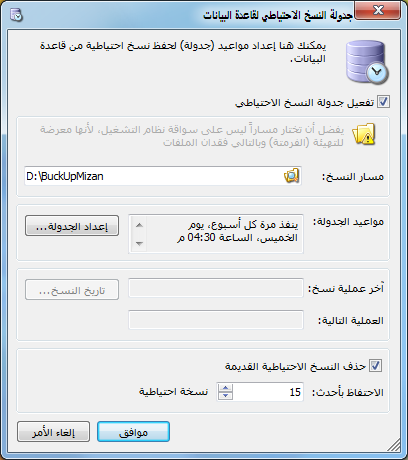
Illustration: automatic backup

Backup Location: Select the folder where backup files will be stored.

Schedule: Set the times at which automatic backups run. Click Configure Schedule, then select the backup times and how often they repeat during the day or on particular days of the week.
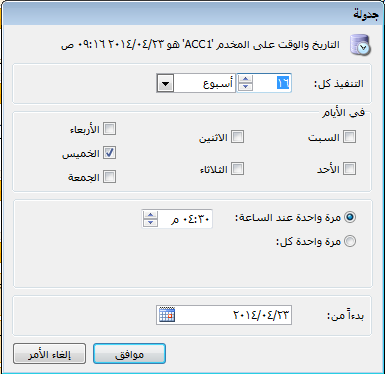
Illustration: automatic backup

.

Backup History: Click Backup History to see scheduled backup operations and whether each succeeded or failed. Common causes of failure include the computer being switched off at the scheduled time, the SQL Server Agent service being stopped or insufficient space in the backup folder.

Delete Old Backups: Enable this option to remove older backups while keeping a specified number of recent copies. Set the number in Keep the Latest … Backups. For example, entering 15 causes the oldest backup to be deleted when the sixteenth backup is created.

Restore a Backup: #

Choose File > Restore Backup. Select Backup File, meaning the backup to restore, and enter a New Database Name. Click Restore to add the restored database under that name. Open File > Connect to Database to find and connect to the restored database.
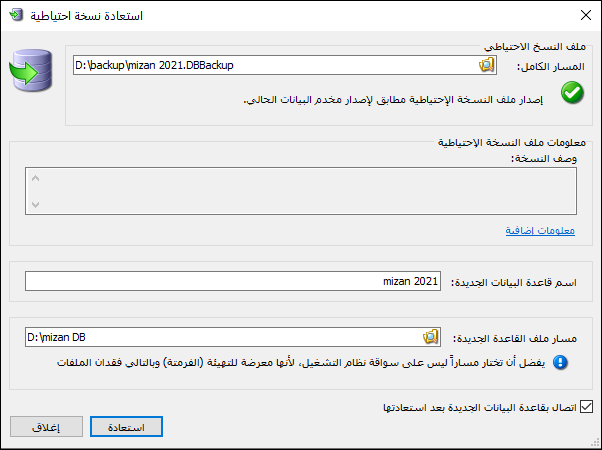
Illustration: restoring a backup

.

See: Create a Database

Follow our YouTube channel

Share This Article

  • Facebook
  • X
  • LinkedIn
  • Pinterest
Could not find what you need? Contact us

How can we help you?

Updated on October 2, 2026
Delete a Database in Al MizanCreate and Set Up a New Database

Powered by BetterDocs

Contents
  • Create a Backup:
    • Manual Method:
    • Automatic Method:
  • Restore a Backup:
Mizan logo black1

Al Mizan .NET Accounting and Inventory: take the next step toward more effective business management

Quick Links

  • Knowledge Base
  • Privacy Policy
  • Terms and Conditions
  • Contact Us

Stay Informed

Get the latest news and offers from our website 

  • Abdurrahman Nafiz Gürman, No:05
    Güngören/İstanbul
  • +905360652643
  • info@hadarasoft.net
© 2026 Hadarasoft
Instagram Facebook-f Youtube Linkedin
Need help? Contact us