


Skip to content
Contact Us
الميزان دوت نت للمحاسبة والمستودعات
  • Home
  • About the Software
    • About Us
    • Our Clients
  • Products
  • Services
  • Learning
    • Knowledge Base
    • Video Tutorials
  • Blog
  • Downloads
    • Al Mizan .NET
    • Updates
    • Utilities
  • العربية
  • Home
  • About the Software
    • About Us
    • Our Clients
  • Products
  • Services
  • Learning
    • Knowledge Base
    • Video Tutorials
  • Blog
  • Downloads
    • Al Mizan .NET
    • Updates
    • Utilities
  • العربية
  • Home
  • About the Software
    • About Us
    • Our Clients
  • Products
  • Services
  • Learning
    • Knowledge Base
    • Video Tutorials
  • Blog
  • Downloads
    • Al Mizan .NET
    • Updates
    • Utilities
  • العربية
Show Categories
  • Home
  • Knowledge Base
  • User Guide
  • File Menu
  • Attach Database Files

Attach Database Files

This function attaches the database files: an MDF file and an LDF file. They are usually stored automatically in C:\Program Files\Microsoft SQL Server\MSSQL\Data.
You can change this location to keep the database files away from drive C:. They are usually saved on another drive in a folder named DBFILES.

  • Purpose and Contents of the Two Files:

1. MDF: This file stores database information, including the rows, columns, fields and data created by an application or user. It stores new entries and the effects of updates and deletions involving one or more records.

2. LDF: As changes are made to the MDF file, the LDF transaction log records database operations to support recovery and transaction management.

Open this window from File > Attach Database.
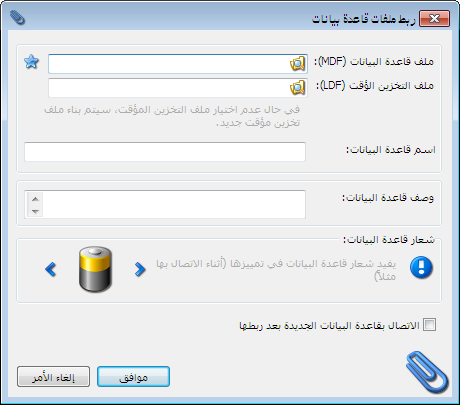
Illustration: attaching database files

.

Also read: Create a New Database

Follow our YouTube channel

Share This Article

  • Facebook
  • X
  • LinkedIn
  • Pinterest
Could not find what you need? Contact us

How can we help you?

Updated on October 2, 2026
Create and Set Up a New DatabaseDelete a Database in Al Mizan

Powered by BetterDocs

Mizan logo black1

Al Mizan .NET Accounting and Inventory: take the next step toward more effective business management

Quick Links

  • Knowledge Base
  • Privacy Policy
  • Terms and Conditions
  • Contact Us

Stay Informed

Get the latest news and offers from our website 

  • Abdurrahman Nafiz Gürman, No:05
    Güngören/İstanbul
  • +905360652643
  • info@hadarasoft.net
© 2026 Hadarasoft
Instagram Facebook-f Youtube Linkedin
Need help? Contact us