


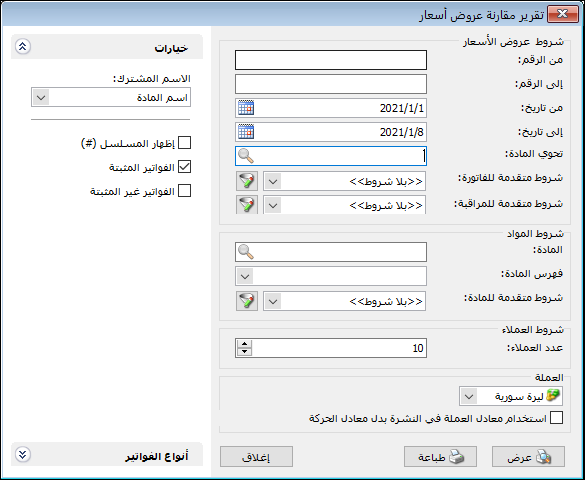
This report compares recorded quotations and the prices at which an item has been bought or sold. Its main use is identifying favorable purchase prices and their sources to support purchasing decisions. The conditions window contains these options:
.
Quotation / Invoice Conditions: #
- From Number / To Number: Specify a number range to display quotation invoices within it.
- From Date / To Date: Specify a date range to display quotation invoices within that period.
- Contains Item: Select an item to include quotations containing it.
- Advanced Invoice Conditions: Specify advanced invoice conditions to include only matching quotations.
- Advanced Audit Conditions: Specify advanced audit conditions to include only matching quotations.
Item Conditions: #
- Item: Select an item to compare quotations only for that item.
- Item Category: Select a category to compare quotations only for items in that category.
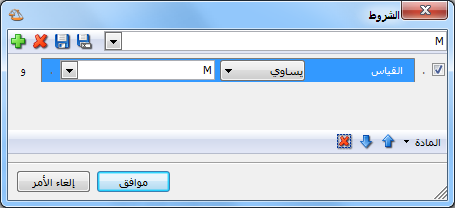
- Advanced Item Conditions: Use information in item records to select items for comparison. For example, compare size M items by defining the advanced condition Size Equals M, as shown below:
.
Customer Conditions:
- Number of Customers: Specify how many customers should appear in the report..
- Currency and Exchange Rate: Select the report currency and its exchange rate relative to the base currency.
Options: #
The options section contains:
- Common Name: Select a field by which to group rows. For example, selecting Category combines item rows by their shared category and displays categories rather than individual items.
- Show Sequence Number: Display sequential row numbers in the report.
- Finalized Invoices: Include quotations from finalized invoices.
- Unfinalized Invoices: Include quotations from unfinalized invoices.
Invoice Types: #
Select the invoice types whose transactions should be included in the quotation comparison.
Show: #
Display the report using the preceding conditions.
Print: #
Click this button to print the final report.
Close: #
Close the report conditions window.
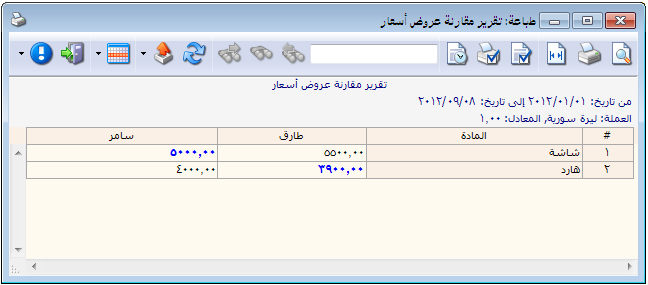
The following illustration shows an example of this report:
.
Examples of Information Available from Quotation Comparison:
- Quotations numbered 1 through 25.
- Quotations received during the first month.
- Quotations containing the Cotton item.
- Quotations from invoices whose descriptions contain Special Quotation.
- Quotations for an item named Monitor.
- Quotations for items in the Computer Parts category.
- Quotations for items whose names contain Shirt.
- Item quotations from finalized invoices only.
.


