


Use this report to print all or part of the chart of accounts. Its conditions window contains the following options:
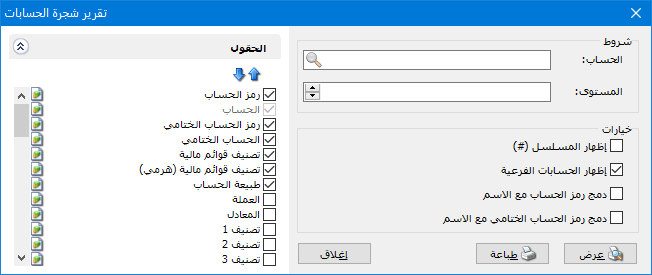
.
Conditions: #
- Account: Select the parent account whose main and subsidiary accounts should appear, or leave this field blank to display all accounts.
- Level: Select the required level of account detail. This corresponds directly to the Level field in the chart of accounts.
Options: #
The main options are:
- Show Sequence Number: Enable this option to display a sequential number for each account in the report.
- Show Subsidiary Accounts: Enable this option to show all subsidiary accounts in the chart of accounts or under the selected account. When disabled, only main accounts are shown.
- Combine Account Code and Name: Displays the account code and name together in one field.
- Combine Closing Account Code and Name: Displays the closing account code and name together in one field.
Fields: #
Select the fields to include in the final report. To change their order, select a field and move it up or down using the blue arrows above the fields list.
Examples of Information Available from the Chart of Accounts Report:
- A report listing all accounts defined in the chart of accounts with any information from their account records.
- A report of customer or supplier accounts showing the currency, city and telephone number for each customer or supplier.
.


